
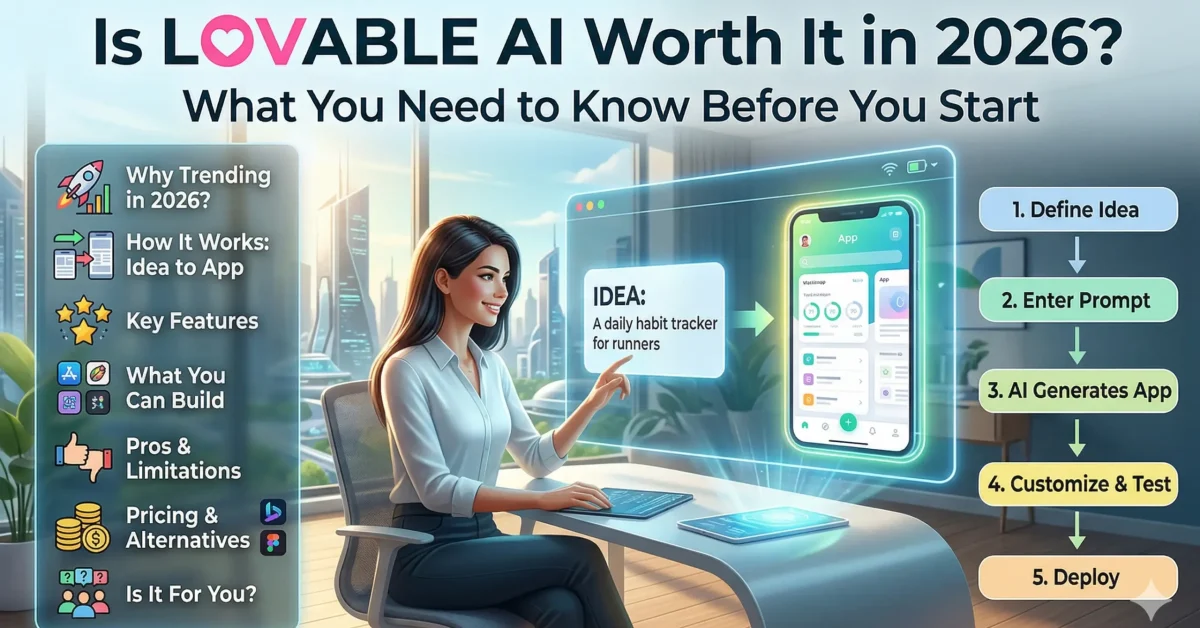
Artificial Intelligence is rapidly transforming the way we build software, and tools like Lovable AI are leading this shift. What once required months of coding and technical expertise can now be done in minutes simply by describing your idea.
This shift has made app development more accessible than ever. Now anyone, from entrepreneurs to designers to beginners, can bring their ideas to life without needing to code.
But with all the hype surrounding AI-powered builders, an important question remains:
Is Lovable AI actually worth it in 2026, or is it just another overhyped tool?
In this guide, we’ll explore everything you need to know, from how it works and its pricing to real limitations and alternatives, so you can decide if it’s the right tool for you.
What Is Lovable AI (And Why It’s Trending in 2026)
Lovable AI is an AI-powered platform that allows users to build applications using natural language. Rather than write code, you just explain what you want, and AI will build an app for you.
This approach is part of a larger trend known as AI-driven development, that makes programming less about technical expertise and more about creativity and innovation.
The reason why Lovable AI is gaining much attention is because of its low barriers to entry. You no longer need years of programming experience to build something useful.
Why It’s Becoming Popular
- It eliminates the need for coding
- It drastically speeds up development
- It allows for quick prototyping and experimentation
- It empowers non-technical users
Lovable AI, in many respects, is not just a tool but a new approach to software development.
How Lovable AI Works (From Idea to App)
Lovable AI is a user-friendly platform that turns your idea into an app. You interact with the system using plain language instructions, and it creates the app step by step. It’s a seven-step process:
- Define your idea
- Enter a prompt
- Generate the app
- Review and Customize
- Refine with better prompts
- Test functionality
- Deploy the app
Step 1: Define your idea
It all begins with an idea. You need to describe what your app should do and who it is for. The quality of your result depends heavily on how clearly you describe your idea.
Good example:
“Create a task manager app for students with deadlines and reminders.”
Bad example:
“Make an app.”
Step 2: Enter Your Prompt
You enter your idea into Lovable AI as a prompt. This is where the system processes your request.
Example prompts:
- “Create a to-do list app that has add, edit, and delete options.”
- “Create a note-taking app with categories and search.”
Step 3: AI Generates the App
Lovable AI generates a simple version of your app. This usually includes:
- User interface (UI)
- Core features
- Basic layout
The initial version is generated quickly but may need improvements.
Step 4: Review and Customize
Once it is generated, you view the app and begin to make adjustments according to your requirements.
You can modify features, adjust layout, improve design, etc.
Example refinement prompt:
“Update the design to be more modern and appealing.”
Step 5: Refine with better prompts
This is the most important step. You improve your app by giving more detailed instructions. In many cases, users need to refine their prompts multiple times to get the desired output.
Example prompts:
- “Add a login system for users”
- “Add a search bar to search for tasks”
- “Include a progress bar”
Step 6: Test functionality
Testing before you release makes sure it works. You must check for:
- Missing features
- Missing functionality
- UX/UI issues
This prevents post-launch issues.
Step 7: Deploy the app
You can then deploy your app to share it with others. At this stage final adjustments are made and the app is ready for use. You can share or publish it.
Lovable AI simplifies app development into a repeatable and beginner-friendly process, but success depends on how well you guide the AI. So, think of it as a smart assistant, not a fully automatic builder.
What’s New in Lovable AI (Latest Updates)
Lovable AI has evolved significantly, particularly with the latest improvements in speed and ease of use. This makes it more than just a tool; it’s becoming a practical solution for real-world projects.
Recent updates include:
- Enhanced user interface design for better layouts
- Better handling of backend logic and workflows
- Faster processing and response times
- More consistent and reliable results
These changes demonstrate the platform is growing more stable for practical use.
Key Features That Make Lovable AI Stand Out
Lovable AI has a number of features that set it apart from other no-code or low-code tools. Rather than drag-and-drop builders, it uses AI-driven automation.
Core features include the following:
- Natural language-based app development
- Full-stack development capabilities (frontend + backend)
- Rapid prototyping for quick launches
- Beginner-friendly interface
These capabilities make it an ideal platform for people who want to get from concept to reality efficiently and without being worried about technical aspects.
What Can You Actually Build with Lovable AI?
Lovable AI is best suited for certain types of projects. While it’s powerful, it does have limitations when it comes to complexity.
What you can build:
- Startup MVPs
- Simple web applications
- Internal business tools
- Personal productivity apps
However, it may struggle with:
- Complex enterprise-level systems
- Highly customized applications
- Large-scale platforms with heavy backend logic
In short, Lovable AI is best used for quick and functional solutions, not highly complex systems.
The Right Audience for Lovable AI
Not all AI tools are useful to all people, and Lovable AI is not an exception. Although it is capable of simplifying the process of creating an app, its usefulness depends on your goals and the nature of the project you want to create. Knowing whether it fits your needs can save you time and effort.
Who will benefit the most?
Lovable AI is a great choice for:
- Beginners with no coding background: It eliminates technicality and gives you the option of creating applications with easy prompts.
- Entrepreneurs testing ideas: Ideal when it comes to fast prototyping with Minimum Viable Products (MVPs) with no need to hire developers.
- Designers and creators: Help transform ideas into executable prototypes without writing code.
- Students and learners: Useful for experimenting and understanding how apps are structured.
Who might struggle with Lovable AI?
Although it has a number of advantages, it is not ideally suited to:
- Experienced developers needing full control: The platform can be restrictive to the traditional coding environment.
- Teams building large-scale systems: Complex applications may need further customization and back-end management.
- Projects with highly specific requirements: AI-based applications might not satisfy specific or technical requirements.
Best Prompts for Lovable AI
One of the biggest factors that determines your success with Lovable AI is how well you write your prompts. A good prompt must be clear, specific, structured, and outcome-oriented.
For example:
“Create a task management app with deadlines, reminders, and a clean, mobile-friendly interface using Lovable AI.”
Basic Prompts for Beginners
If you’re a beginner and following a Lovable AI tutorial, start simple and focus on core functionality. These examples will give you an idea of how this no-code AI app builder functions.
- Develop a to-do list application with add, edit, and delete features.
- Create a basic notes application that has categories and a search feature.
These generic prompts create a starting point, which will be subsequently refined step by step.
Intermediate Prompts
After getting familiar with the fundamentals of creating apps using AI, you can proceed to more advanced and more feature-rich prompts.
- Develop a task management application that has user login, dashboard, and deadlines.
- Create a reading list application with search, categories, and tracking progress.
Lovable AI: Prompt Template
Create a [type of app] with [core features].
Include [extra features].
Design must be [style].
Make sure the app is [performance/UX requirement].
Example:
Create a workout and progress tracking fitness app.
Include reminders and analytics.
The design should be modern and clean.
Make the application mobile-friendly.
Limitations You Should Know Before Using Lovable AI
Although Lovable AI is a great tool to create an app without writing a line of code, one should be aware of its limitations before fully depending on it. Being aware of these limitations can make you have realistic expectations and utilize the tool in the most effective way.
The most frequent challenges are:
- Restricted customization: Not all design or functionality is completely customizable.
- Reliance on prompt quality: The quality of the output of the AI is as good as your prompts.
- Occasional errors: Some features or outputs may require manual fixes or refinements.
It’s also important to note that Lovable AI is not fully automated. You still need to guide the AI carefully, especially when improving features, refining UI, or troubleshooting issues. Knowing about these limitations will help you use Lovable AI to your advantage, prevent frustrations, and make wiser choices when developing an app development workflow.
Lovable AI Pricing & Plans
Before you sign up for Lovable AI, you need to know how much it costs. The tool has great AI app-building features, but the best plan for you depends on what you need. Are you just starting out, building MVPs, or making more complicated apps?
Here’s how Lovable AI usually charges for its services:
| Plan | Features | Best For | Price |
| Free | Basic AI app creation, limited prompts, access to templates | Beginners testing ideas | $0 |
| Pro | More prompts, priority support, basic analytics | Small apps and personal projects | $25/month |
| Business | Advanced features, API access, higher usage limits, full customization options | Entrepreneurs and professional app creators | $50/month |
| Enterprise | Custom AI solutions, dedicated support, team collaboration, unlimited projects | Large teams and businesses | Custom pricing |
Lovable AI Alternatives: Other Tools to Consider
If Lovable AI doesn’t fully meet your needs, there are several alternatives worth considering.
Here’s a quick comparison:
| Platform | Best For | Platform Type | Key Strength | Pricing |
| Cursor AI | Developers & engineers | AI-assisted coding | Accelerates coding, intelligent suggestions, backend integration | Free & Pro tiers (depends on IDE integration) |
| Bolt.new | Rapid UI prototyping | No-code prototyping tool | Fast interactive screen creation, easy drag-and-drop | Free & Paid plans (starts at $12/month) |
| Vercel | Deployment & hosting | Deployment & cloud platform | Enterprise-grade hosting, scalable, integrates with frameworks | Free & Pro ($20/month) |
| Bubble | Full-featured web apps | No-code platform | Database integration, custom workflows, complex logic | Free, Personal $29/month, Professional $129/month |
| Adalo | Mobile-first apps | No-code mobile app builder | Publish to App Store & Google Play, database integration | Free, Pro $50/month |
| Glide | MVPs & simple apps | No-code spreadsheet-to-app | Turn Google Sheets into apps quickly, beginner-friendly. | Free, Pro $32/month |
Is Lovable AI Worth It in 2026? (Final Verdict)
The answer is based on how you intend to use it after considering its features, pricing, and constraints.
Lovable AI is worth it when:
- You want to build apps quickly.
- You lack coding experience.
- You are developing prototypes or MVPs.
However, it may not be the best choice if:
- You require high-level customization.
- You’re building a large-scale system.
- You need complete technical control.
Lovable AI is an effective starting point to develop an app, but it does not substitute traditional approaches entirely.
Is Lovable AI beginner-friendly?
Yes, it’s designed for users with little to no coding experience.
Is Lovable AI free?
It offers a free plan with limited credits, but advanced features require a paid subscription.
Can Lovable AI replace developers?
No, it helps speed up development but cannot fully replace skilled developers.
Can I build professional apps with it?
You can build prototypes and simple apps, but complex systems may require traditional development.
