

Can People See What You Save on Instagram? No, people cannot normally see what you save on Instagram. Your saved posts, Reels, videos, and personal collections are private to your account. Instagram also doesn’t tell someone that you saved their post.
There is one important exception: Collaborative Collections. If you intentionally save content to a collaborative collection, other people participating in that collection can see the shared content.
Here’s exactly what is private, what creators can see, and when your Instagram saves may be visible to someone else.
Can People See Your Saved Posts on Instagram?
No. Posts you save normally are kept in the private Saved section of your Instagram account.
Your followers can’t open your profile and see:
- Posts you’ve saved
- Reels you’ve saved
- Videos you’ve saved
- Your personal collections
- The names of your personal collections
Instagram saves work like private bookmarks. Other people can’t normally see the posts you’ve bookmarked through the Save feature. That’s different from liking or commenting. A like may be visible to other users, while a comment appears on the post. A normal save stays private.
You can save recipes, travel ideas, outfits, tutorials, memes, or anything else you want to revisit without displaying those saves on your profile.
Does Instagram Notify When You Save a Post?
No. Instagram does not send the creator a notification when you save their post. For example, if you save someone’s photo or Reel, they won’t receive a notification saying that your account saved it.
They also don’t get a list containing the usernames of everyone who saved the content. That’s true even if you’re following each other.
Can Someone See If You Saved Their Instagram Post?
No. They cannot see that you specifically saved their post. There is an important difference between knowing that content received saves and knowing who saved it.
Eligible professional accounts have access to Instagram Insights and engagement metrics. This can provide creators with information about how their content performs. But it doesn’t mean the creator receives a list identifying everyone who saved a post. So even when save-related engagement information is available, your individual identity isn’t revealed simply because you pressed Save.
Can You See Who Saved Your Instagram Post?
No. Instagram doesn’t provide a feature that gives you a list of the usernames of people who saved your post.
Professional accounts have access to more analytics than regular personal accounts through Instagram Insights, but analytics should not be confused with a list of individual savers.
So if you’re wondering, “Can I see who saved my Instagram post?”, Instagram doesn’t normally provide that information.
You should also be careful with third-party apps or websites claiming they can reveal exactly who saved your posts. If Instagram itself doesn’t provide you with that information, you shouldn’t assume an outside service can reliably uncover it.
Can People See Your Saved Reels or Videos on Instagram?
No. Saved Reels and videos are normally private, just like regular saved posts. Someone can’t visit your profile and browse through the Reels or videos you’ve bookmarked.
The creator also isn’t shown your username simply because you saved their Reel or video. Your followers therefore can’t normally see your saved Reels either.
The main exception is when you intentionally save content to a Collaborative Collection, which is designed to be shared with other participants.
Are Saved Posts on Instagram Private?
Yes. Regular Instagram saves are private. Meta has explained that posts saved to personal Instagram collections are visible only to the person who saved them.. Here’s the easiest way to understand what other people can and cannot see:
| Instagram activity | Can other people see it? |
|---|---|
| Save a regular post | No |
| Save a Reel or video | No |
| View your personal Saved section | No |
| Create a personal collection | No |
| Creator sees that you specifically saved their post | No |
| Professional account accesses save-related engagement data | May be available as Insights |
| Save content to a Collaborative Collection | Yes, collection participants can see shared content |
So when people ask whether Instagram saves are public, the answer is generally no. There is, however, one privacy exception worth understanding.
The Exception: Instagram Collaborative Collections
Instagram’s Collaborative Collections are designed for sharing saved content with other people.
Instead of keeping a collection that only you can access, you can create a collaborative collection with friends. Participants can save content to the collection and see posts other members have added.
For example, you might create one for:
- Travel ideas
- Restaurants
- Recipes
- Outfit inspiration
- Memes
- Home decor
- Workout ideas
This means content saved to a Collaborative Collection isn’t private from the people participating in that collection. Meta also says that when new content is saved to a Collaborative Collection, activity can appear in the associated chat.
This doesn’t make your regular Saved section public. Your personal collections remain separate from collaborative ones. If privacy matters, pay attention to which collection you’re choosing when saving a post.
Can Your Followers See What You Saved on Instagram?
No. Your followers can’t see what you save on Instagram or browse your personal Saved collections.
For example, you might organize your saved posts into collections such as:
Recipes
Travel Ideas
Things to Buy
Workout Plans
Those personal collections aren’t displayed publicly on your profile.Your followers can’t browse their names or contents simply because they follow you. A Collaborative Collection is different because it is intentionally shared with selected participants.
How to Find Your Saved Posts on Instagram
If you’ve saved something and want to find it again:
- Open Instagram.
- Go to your profile.
- Open the menu in the upper-right corner.
- Select Saved.
- Open the collection or saved content you’re looking for.
Instagram may change its interface or menu wording over time, but saved content is managed through your account rather than being displayed publicly on your profile.
You can also organize saved posts into collections to make older content easier to find.
Can Third-Party Apps Tell Who Saved Your Instagram Post?
Be skeptical of any app or website claiming it can reveal the identities of people who saved your Instagram posts. Instagram doesn’t normally provide users with a list of accounts that saved a particular post.
Giving an unknown third-party service your Instagram password or account access simply to uncover supposedly hidden save information can create unnecessary privacy and security risks.
If you want to understand how your own content is performing, Instagram’s built-in professional tools are a safer choice than apps promising access to information Instagram doesn’t normally show you.
Saving vs. Liking on Instagram
Saving and liking may seem similar, but they’re different when it comes to visibility. When you like a post, that interaction may be visible to other people.
When you comment, your comment appears on the content unless it is removed or otherwise restricted. A regular save is private. That’s why saving is useful when you want to bookmark something for later without making that action publicly visible.
How to Manage Your Instagram Privacy Settings
Your regular Instagram saves are already private, but there are a few other settings worth reviewing if you want more control over your account.
Make Your Account Private
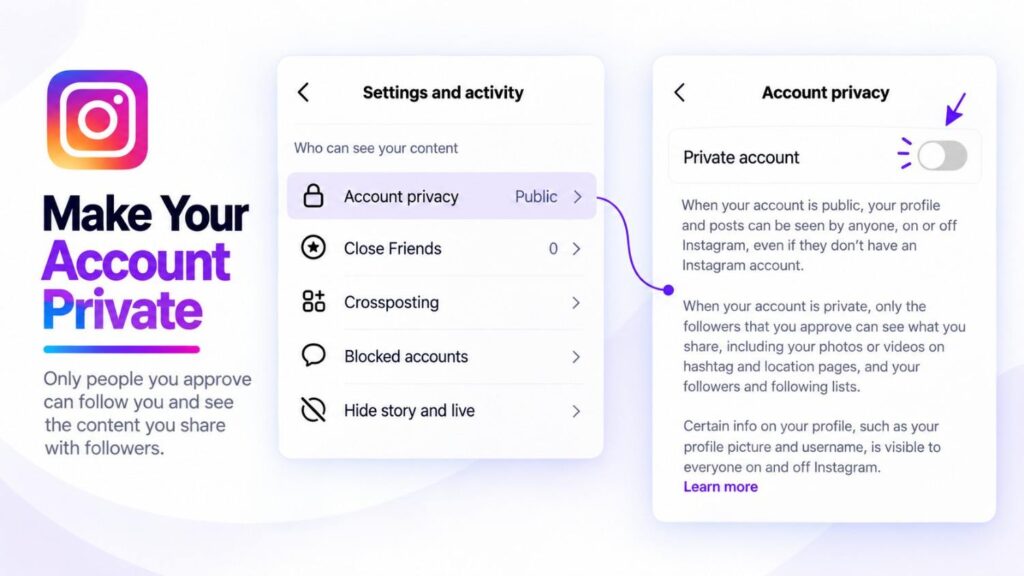
With a private personal account, only people you approve can follow you and see the content you share with followers.
To review this setting, open Instagram and go to your profile, then open the menu and look for your account privacy settings. Turn on Private account if you don’t want your posts available to everyone.
Keep in mind that professional accounts may work differently from personal accounts when it comes to account privacy.
Turn On Two-Factor Authentication
For additional account security, enable two-factor authentication (2FA). This adds another verification step when someone tries to access your account.
Meta provides two-factor authentication controls through Accounts Center → Password and security → Two-factor authentication.
None of these settings make your normal Saved section more private—it is already private from other users. They simply give you more control over the rest of your Instagram account.
What Happens If You Unsave a Post?
If you no longer want something in your saved content, tap the save or bookmark icon again to remove it. Instagram doesn’t normally notify the creator when you unsave their content either.
Also remember that saving something isn’t the same as downloading or permanently storing it. If the original content is deleted or otherwise becomes unavailable, saving it doesn’t guarantee you’ll still be able to access it.
Final Answer: Can People See What You Save on Instagram?
For normal saves, no.
Your followers, friends, and other Instagram users cannot normally see the posts, Reels, or videos you’ve saved. The person who created a post also cannot see that your specific account saved it.
Professional accounts may have access to save-related engagement information through Instagram’s analytics tools, but that doesn’t give them a list identifying individual people who saved a post.
The important exception is Collaborative Collections. Content intentionally saved to one of these collections is shared with its participants.
So if you’re using Instagram’s regular Save feature and keeping content in your personal Saved section or private collections, your saves remain private.
Frequently Asked Questions
1. Can people see your saved posts on Instagram?
No. Regular saved posts are stored privately in your account and aren’t displayed to your followers or profile visitors.
2. Does Instagram notify someone when you save their post?
No. The creator doesn’t normally receive a notification telling them that your account saved their post.
3. Can someone see if you saved their Reel?
They cannot normally see that your specific account saved their Reel. Professional analytics may provide save-related engagement information without giving creators a list of individual savers.
4. Can people see your saved videos on Instagram?
No. Videos and Reels you normally save are kept in your private Saved section.
5. Can you see who saved your Instagram post?
No. Instagram doesn’t provide a list showing the usernames of people who saved your post.
6. Are Instagram collections private?
Personal collections are private. Collaborative Collections are different because they’re intentionally shared with other participants.
7. Can people see your bookmarks on Instagram?
No. Posts you bookmark using Instagram’s regular Save feature are private. They aren’t displayed to followers or other profile visitors.
8. Can people see the names of your Instagram collections?
Other users cannot normally see the names of your personal saved collections. People participating in a Collaborative Collection can access that shared collection.
9. Can a third-party app show who saved your Instagram post?
You shouldn’t trust an app simply because it claims to reveal who saved your posts. Instagram doesn’t normally provide users with a list of individual savers, and giving unknown services access to your account can create privacy and security risks.
