
TL;DR
- Short verdict: Akool is a solid all-in-one AI video and image platform, but it is not the best pick for everyone.
- Price: There is a free plan with a watermark. Paid plans start at $12 a month when billed yearly.
- Who it fits: Marketers, small teams, and creators who want AI video generation, AI image generation, face swap, and avatars in one place.
- The main catch: Credits go fast, commercial use needs the Business plan, and some users report billing and refund problems.
- Our advice: Try the free plan first, then decide.
What Is Akool?
Search for Akool and you will find big claims. Some pages call it the best AI video platform around. Others say it is overhyped.
So we skipped the hype. We went through Akool’s official website, its pricing page, its trust and safety page, and public user reviews on G2 and BBB. This review covers what Akool does, what it costs, where it falls short, and who should use it.
First, a quick reason why tools like this are everywhere. According to Wyzowl’s 2026 State of Video Marketing report, 91% of businesses use video as a marketing tool, and about 82% of video marketers say it gives them a good return. Video is now the normal way to sell and explain things, and that is the gap Akool wants to fill.
Akool is a generative AI platform built by Akool Inc., a company based in Palo Alto, California. You can visit it at akool.com.
The company says it has over 300 million asset creations and Fortune 500 customers. Those are its own numbers, and we could not check them independently.
What Is the Akool AI Video Suite?
The Akool AI Video Suite is the name for the full set of tools on the platform. It covers video generation, image generation, face swap, avatars, voice tools, and video translation.
You do not need separate apps for each job. That is the main idea.
Key Features of the Akool AI Video Suite
Akool’s main products are covered below.
AI Video Generator
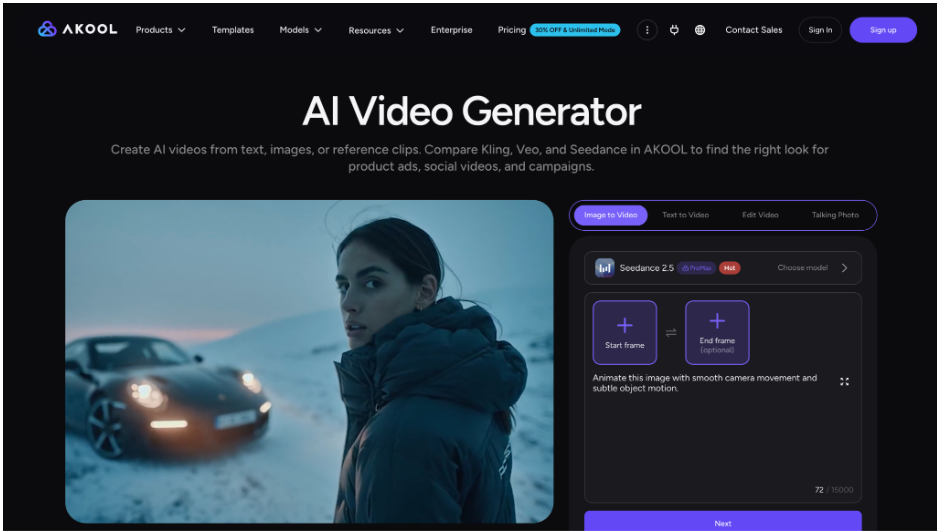
The AI Video Generator is the core of Akool AI Video Suite.
You can make videos from text, from a single image, from another video, or from reference images.
Akool does not rely on one model. It gives you access to several well-known ones, including Seedance, Kling, Wan, MiniMax, Google Veo, Sora, and Vidu.
On its homepage, Akool says Seedance 2.5 can make cinematic 4K video with region editing and native audio. We could not test that claim ourselves, so treat it as the company’s description.
There is also Shorts Studio, which turns your footage into short-form videos, and an Agentic Canvas for building projects in one workspace. Once your clips are ready, you can resize them for any platform before posting.
AI Image Generator
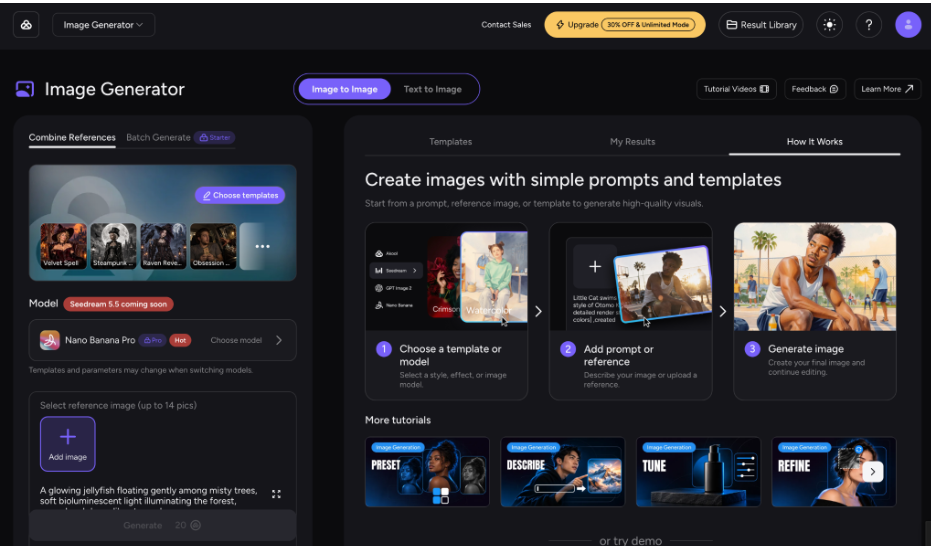
The AI image generator turns a text prompt into a picture. It also supports image-to-image edits and background changes.
Models listed on the site include Nano Banana Pro, Flux, GPT Image 2.0, Seedream, Recraft, and Qwen Image. Akool says images can go up to 4K, which is useful for social posts and ad visuals.
Face Swap
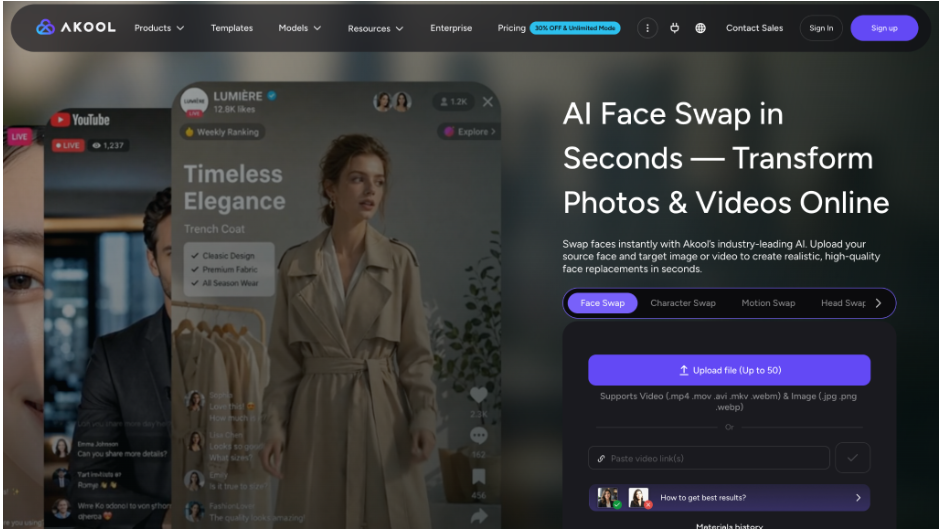
Face swap is where Akool built its name. You can swap faces in photos and videos, and Akool also offers character swap, motion swap, head swap, hair swap, and clothing swap.
There is a live face swap option too, with time limits that depend on your plan. Based on the homepage, a face swap starts at about 4 credits, and a hair swap starts at 6.
Realistic Video Generator Tools
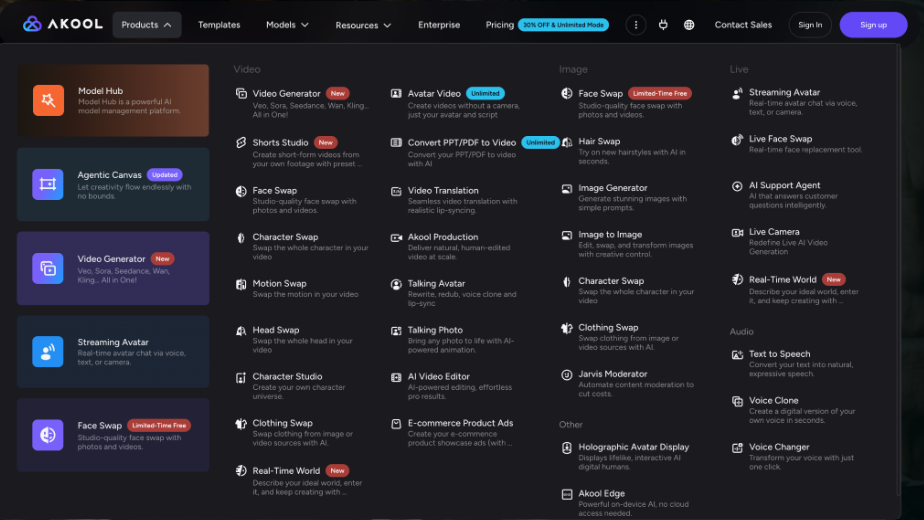
This part is about people on screen:
- Avatar Video: Pick an avatar, add a script, and get a talking video without a camera.
- Talking Photo: Turn a still photo into a speaking video.
- Streaming Avatar: A live avatar that talks back in real time.
- Voice tools: Text-to-speech, voice cloning, and a voice changer.
- Video Translation: Supports 155+ languages with lip sync.
These are the tools that make a video feel more real. Results still depend on your source photo, script, and settings.
Model Hub and API
Akool has a Model Hub where you can reach many AI models in one place. It also has an API for developers and teams who want to build video features into their own apps. API access is included from the Pro Max plan.
How Akool Works (Step by Step)
Here is the normal flow:
- Go to akool.com and create a free account.
- Pick a tool, for example, Video Generator, Image Generator, or Face Swap.
- Choose a model if the tool offers a choice.
- Add your prompt, image, video, or script.
- Set the resolution and length.
- Check the credit cost before you hit Generate.
- Generate, review the result, and download it.
Tip: Start with short clips. Credits are used on every run, so small tests save money.
Akool Pricing and Credits
Akool uses a credit system, and different tools use different amounts of credits. Here is what the official pricing page showed on November 9, 2026. Yearly prices carry a 30% discount.
| Plan | Price (Billed Yearly) | Monthly Price | Credits per Month | Notes |
|---|---|---|---|---|
| Free | $0 | $0 | Limited | Full-screen watermark, slow processing |
| Starter | $12 per seat | See pricing page | 200 | Up to 1080p, personal license |
| Pro | $21 per seat | $30 per seat | 600 | Up to 4K, no watermark, personal license |
| Pro Max | $41.30 per seat | $59 per seat | 1,200 | Up to 8K, API access, Seedance 2.5 access |
| Business | $174.30 per seat | $249 per seat | 6,000 | Up to 16K, business license, 1 Studio Avatar |
| Enterprise | Custom | Custom | Custom | SSO, dedicated support, enterprise license |
A few things worth knowing:
- On Starter, 200 credits equal about 20 Kling 3.0 videos or 100 Nano Banana Pro images, according to Akool.
- Seedance 2.5 is not available on Starter or Pro. It starts at Pro Max.
- The Starter, Pro, and Pro Max plans carry a personal license. If you need a business license, you need the Business plan.
- Extra admins or editors in a workspace are charged at the same rate as the owner.
- Prices change often, so always confirm on the official pricing page before you pay.
Pros, Cons, Safety, and Who It Suits
Pros
- Many tools in one place: video, images, face swap, avatars, and voice
- Access to many top models without separate accounts
- Easy to use, even for beginners, which G2 reviewers mention most often
- A free plan to test before you pay
- High-resolution options on higher plans
On G2, Akool holds a 4.8 out of 5 rating from 563 reviews. That is a strong score, but keep in mind that review sites can lean positive.
Cons
- Credits run out quickly, especially with video.
- Some G2 users report slow rendering during busy hours and with 4K output.
- Some users say they lost credits on results they did not like.
- Commercial use is limited to the Business plan and above.
- Several billing and refund complaints exist. One BBB complaint is about an automatic renewal, and some Trustpilot users report refund trouble.
- Some users find the price high for the output.
We cannot say how common these issues are, but they show up often enough that you should read the billing and refund terms first.
Is Akool Safe?
Akool lists several security and compliance points on its trust and safety page:
- SOC 2 Type II certification
- ISO/IEC 27001
- ISO/IEC 42001
- GDPR compliance
- Encryption in transit and at rest
- Content moderation with automatic detection and human review
These are the company’s own statements, and we did not audit them.
Face swap needs extra care. Only use faces you have the right to use, get consent from the person first, and do not use it to mislead people. Before uploading private photos or client files, read the privacy policy and check how your data is stored.
Who Akool Suits
Akool fits you if you are:
- A marketer who needs fast social videos and ad visuals
- A small business owner without a video team
- A content creator who wants many models in one place
- An agency that needs avatars, translation, and face swap
Akool may not fit you if you:
- Want a fully free tool
- Need only one model, like Kling or Veo, and want to pay that company directly
- Need very low and predictable costs
Akool vs Other Tools: Is It the Best AI Tool for Video Generation in 2026?
The honest answer is that it depends on your job.
| Tool Type | Best For | How Akool Compares |
|---|---|---|
| Akool | One place for video, images, face swap, and avatars | Broad toolset and many models |
| HeyGen | Avatar videos and video translation | Similar avatar focus; Akool adds image and model access |
| Synthesia | Training and corporate avatar videos | More focused on business training; Akool is wider |
| Runway | Creative filmmaking and editing | Runway suits creative editing; Akool suits marketing workflows |
| Using models directly (Kling, Veo, Seedance) | One model, direct control | Akool bundles them; direct use may suit single-model needs |
This table is a general guide. Features and prices change, so check each tool’s own website.
So, is Akool the best AI tool for video generation in 2026? It is one of the strongest all-in-one options for marketers and small teams, but it is not the best for every person.
If you want one dashboard for AI video generation, AI image generation, and face swap, Akool makes sense. If you only need one thing, a focused tool may cost less.
FAQs
What is Akool?
Akool is a generative AI platform for video, images, face swap, avatars, and voice. It is run by Akool Inc. in Palo Alto, California.
Is Akool free?
There is a free plan, but it has limits, a full-screen watermark, and slower processing. Paid plans remove the watermark.
How much does Akool cost?
Paid plans start at $12 a month when billed yearly. Pro is $21, Pro Max is $41.30, and Business is $174.30 per seat on yearly billing. Check the official pricing page for current rates.
Is Akool legit and safe?
Akool is a real company with public reviews and listed security certifications. We could not audit those claims, so read the privacy policy and the refund terms before you pay.
Can I use Akool videos for business?
The Starter, Pro, and Pro Max plans carry a personal license. The Business plan has a business license, and Enterprise has its own license.
Does Akool have face swap?
Yes. It supports photo and video face swap, plus live face swap, character swap, head swap, hair swap, and clothing swap.
What is the best AI tool for video generation in 2026?
There is no single winner. Akool is a strong all-in-one pick for marketing work, while other tools may suit single tasks better.
Final Verdict
Akool does a lot in one place. The video generator gives you many top models, the image generator is easy to use, face swap is a big part of the platform, and avatars and translation add more reach.
The weak spots are credit use, a personal license on most plans, and a number of billing complaints.
If you want an all-in-one AI video suite, test the free plan and run a few small projects. Check how fast your credits drop, then pick a plan. And if a downloaded file ever comes out corrupted, AI video repair tools can often fix it.
Official website: https://www.akool.com
Last checked: Nov 9, 2026. Prices and features can change.
