
For years, the virtual private network was the standard answer to remote work. An employee connected to a gateway, authenticated once, and received a path into the corporate network that felt much like sitting in the office. That model suited a world where most users, applications, and data lived inside one perimeter.
Today, applications run in several clouds, contractors connect from unmanaged devices, and a large share of staff never visit an office. The assumptions behind the traditional VPN no longer match how work happens, and security teams are noticing the strain.
The sections below explain what VPNs were designed for, why they invite lateral movement, how performance and management problems arise, and which alternatives organizations are adopting.
What the Traditional VPN Was Built to Do
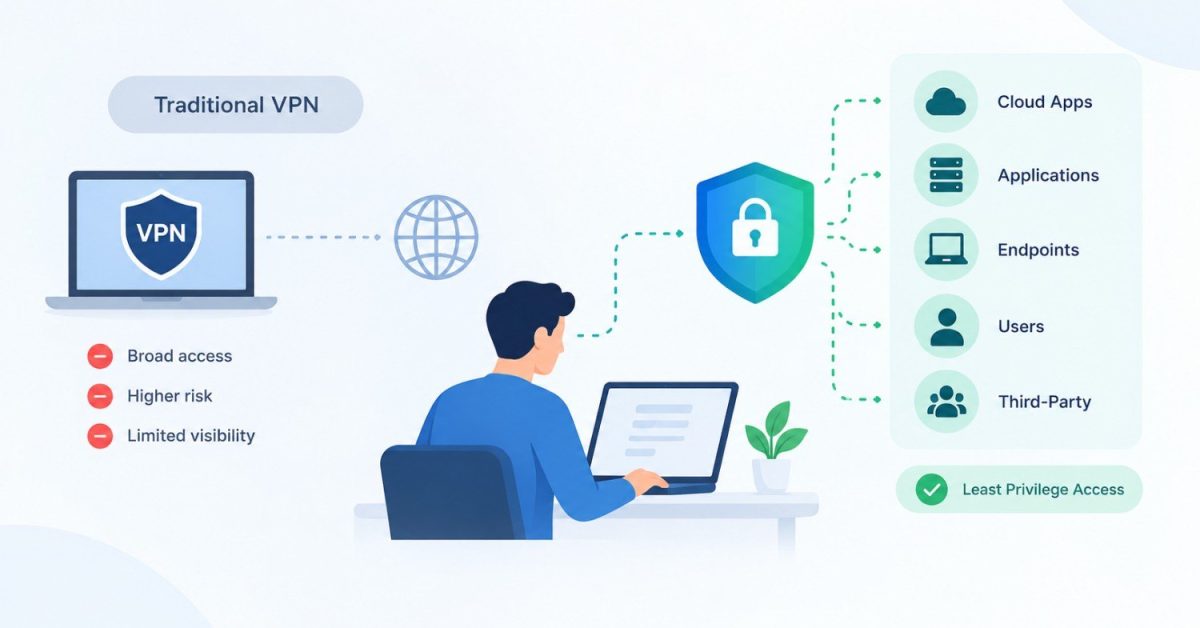
A classic VPN creates an encrypted tunnel between a remote device and a gateway on the corporate network. After authentication, the device receives an internal address and can reach whatever the network allows. The design reflects a castle-and-moat idea: keep the outside hostile, treat the inside as trusted, and use the VPN as a drawbridge for approved visitors.
That approach worked while the number of remote users was small and the applications sat in a single data center. Capacity planning was simple, since remote access was an exception rather than the rule. Administrators knew which servers the VPN could reach, and traffic from remote users came through one choke point.
Three developments broke those assumptions:
- Cloud services moved applications out of the data center, so sending cloud traffic through a corporate gateway added detours.
- Remote and hybrid work turned the VPN from an occasional tool into daily infrastructure for most employees.
- Attackers learned that a stolen credential or an unpatched VPN appliance gives access to the entire internal network.
None of this makes encrypted tunnels useless. The encryption itself remains sound. The criticism concerns the trust model attached to it, which grants broad network-level access after a single authentication, and the architecture that funnels everything through a single point.
Broad Access Invites Lateral Movement
The central security concern is how much a VPN connection can reach. Once connected, a user’s device often sits on the same flat network as servers, printers, and other workstations. If the device is compromised, or the credentials are stolen, an attacker inherits that position.
From there, lateral movement begins. The intruder scans the network, looks for exposed services and weak credentials, and pivots from one system to another until reaching something valuable, such as a domain controller or a file server. Because the traffic originates from a trusted VPN address, many controls treat it as normal.
Contractors and vendors increase the risk. Granting a third party VPN access to complete one task often exposes far more than the task requires, and the access tends to outlast the project. Unmanaged personal devices make the problem worse, since the organization cannot check their security state.
VPN gateways are also attractive targets in themselves. They sit on the internet edge, hold authentication functions, and have been the subject of numerous published vulnerabilities and active exploitation campaigns. A flaw in an appliance that every remote user depends on is a serious exposure, and patching it requires scheduling downtime for the same people who need it most.
Many organizations now ask a different question: instead of letting a connected user reach the network, why not let that user reach only the specific applications they need?
Performance and Management Friction Add Up
Security is not the only pressure. User experience and operations also push teams to reconsider.
Backhauling traffic: This is a common complaint. When a remote worker opens a cloud application, the VPN may route the request to the corporate gateway first, then out to the internet. That detour adds latency and consumes bandwidth at the gateway, which can slow video calls and file transfers. Split tunneling reduces the problem, but it creates its own risks by letting some traffic bypass inspection.
Capacity limits: Gateways have limits on concurrent connections and throughput, and demand spikes during emergencies, such as severe weather or a public health event, can overwhelm them. Adding capacity means buying hardware, licenses, and bandwidth that sit idle the rest of the year.
Clumsy user workflow: Clients need installation and updates, connections drop on unstable networks, and users reconnect repeatedly during the day. Each issue produces help desk tickets.
Limited visibility: A VPN log shows who connected and when, but it says little about what the user did inside the network. Auditing specific application access requires extra tooling. Compared with models that record each access request, the VPN provides a coarse view that makes investigations and compliance reporting harder.
Zero Trust Network Access and Other VPN Alternatives
Organizations evaluating VPN alternatives most often start with zero trust network access, commonly shortened to ZTNA. The principle is to never assume trust based on network location. Each access request is evaluated against the user’s identity, the device’s health, and the sensitivity of the application, and approval grants access to that one resource, not the network around it.
In practice, ZTNA services place a broker between the user and the application. The user authenticates, the broker checks policy, and a connection is created to the specific application. The application can stay hidden from the internet, which reduces its exposure to scanning and attack. If a device is compromised, the intruder reaches only what that user was authorized to use, and lateral movement gets much harder.
Other options address different needs:
- Secure access service edge (SASE) platforms combine network and security functions in a cloud service, which can suit distributed organizations.
- Browser-based access gateways give contractors access to specific web applications with no client software.
- Software-defined perimeter designs hide infrastructure until a user is verified.
Teams comparing these options should match each one to their application mix. Web and cloud applications fit ZTNA easily, while legacy applications that depend on broad network connectivity may need extra planning, much like any effort to modernize legacy systems step by step. Compatibility with the identity provider, support for the device types in use, and the quality of logging are practical points to check during evaluation.
Device Posture and Access Control
Replacing the tunnel is only part of the story. Strong remote access depends on knowing the state of the device making the request, and on controlling what connects to the network in the first place.
Several controls work together to support that goal:
- Device posture checks confirm that the operating system is patched, disk encryption is on, and endpoint protection is running before access is granted.
- Certificate-based authentication ties access to a specific managed device, not only to a password that can be stolen.
- Phishing-resistant multifactor authentication guards the identity itself, since a stolen password alone should not open the door.
- Network access control restricts what connects on site, placing unmanaged or noncompliant devices in limited segments.
- Continuous verification rechecks risk during a session, so a change such as a disabled security agent can reduce or end access.
These measures reflect the same idea behind the shift away from VPNs: access should depend on verified identity, device condition, and context, not only on a successful login. They also help with the growing mix of devices, from managed laptops to personal phones and Internet of Things equipment.
Policy deserves careful design. Define roles and applications first, grant the minimum access each role needs, and review the rules periodically. A fine-grained policy that nobody maintains drifts into the same overbroad access the organization wanted to escape.
Planning a Phased Migration
Migration needs the same care as policy. A full replacement overnight is rarely practical. Most organizations migrate in phases, and a sound plan limits disruption.
- Inventory applications and users. Classify each application by how it is accessed, whether through a web browser, a thick client, or a legacy protocol, and by how sensitive its data is. That map shows which applications can move first and which need more work. A stable, well-documented network infrastructure makes this step much easier.
- Pilot with a manageable group. Start with contractors or a single department. Choose applications that are easy to publish through the new approach, and gather feedback on usability and speed. Early successes build support and expose integration issues while the stakes are low.
- Run both systems in parallel. Keep the VPN for applications that have not yet moved, and shrink its scope over time by removing network ranges as each application migrates. Restrict VPN access to a smaller group, and apply stricter authentication to the remaining users.
- Track results throughout. Monitor help desk tickets, connection times, and the volume of access requests. Measure the reduction in network reach per user, since narrowing that reach is the main security objective.
- Decommission carefully. Remove VPN components only after confirming that nobody depends on them.
Final Thoughts
Businesses are moving beyond traditional VPNs because the model behind them no longer fits modern work. Broad network access after one login invites lateral movement, gateway appliances are attractive targets, and routing traffic through a central point hurts performance and complicates operations.
Zero trust network access and related approaches replace broad tunnels with narrow, verified connections to specific applications, supported by device posture checks and strong authentication. A phased migration, guided by an application inventory and careful policy, allows organizations to reduce risk without disrupting the people who depend on remote access every day.
