
A lot of people now use ChatGPT, Claude, or Gemini somewhere in their writing process. Some use it for an outline, some for a rough first draft, and some only to fix grammar. The awkward part comes later: the first person to run your work through an AI content detector is often a teacher, an editor, or a client, and you only find out what it said after you have submitted.
A free AI detector lets you see roughly what they will see, before it matters. This guide covers what these tools measure, what to look for in one, how to read the score, and a short routine you can run on any draft in 2026.
What a Free AI Detector Actually Measures
Language models write by predicting the next likely word. That habit leaves patterns in the finished text: sentences of very similar length, safe transition phrases, adjectives that never commit to anything, and paragraphs that all follow the same shape. An AI checker looks for those patterns and estimates how much of your text reads like model output.
Two things follow from this:
- A detector never sees your prompt or your chat history. It only reads the words you paste in.
- It judges style, not authorship. A careful, very tidy human essay can score high, and a heavily edited AI draft can score low.
Keep that in mind every time you look at a percentage. Search engines face the same challenge, as we explain in our guide on whether Google can tell your content is AI-written.
The Main Types of AI Checkers in 2026
Public Self-Check Tools
These run in a browser, and anyone can open them. Most have a free tier, and some need no account at all. DetectGPT, ZeroGPT, and GPTZero all fall into this group. They differ in word limits per scan, whether they highlight specific lines, and whether they include a plagiarism check alongside the AI score.
Campus and Publisher Tools
Turnitin’s AI writing indicator is the best-known example. Schools and publishers license it, and the report usually goes to the instructor. Most students cannot run their own paper through it before submitting, which is the main reason public tools became popular as a pre-check.
Checks Built Into Writing Platforms
Some writing apps, content platforms, and freelance marketplaces now run their own AI checks in the background. You often cannot see the score or the method, so a separate public check is the only way to look at your draft first.
What to Look for in a Free AI Detector
Not every free tool is useful for a quick self-check. Before you rely on one, look for these points:
- No signup: If you have to create an account to see the result, you are less likely to check every draft.
- A word limit that fits your work: A 500-word cap is fine for a blog intro and useless for a 2,500-word essay.
- Line-level highlights: A single number tells you there is a problem. Highlighted sentences tell you where it is.
- Support for any model: A good ChatGPT detector should also handle text from Claude, Gemini, Grok, and newer models, since it reads style rather than a model signature. New models appear constantly, as our large language model news roundup shows.
- Clear privacy terms: Check whether your text is stored, and avoid pasting confidential material into any tool.
- A separate plagiarism or similarity check: AI detection and plagiarism are different problems, and it helps to check both in one place.
- Honest limits: A tool that promises 100% accuracy is overselling. The useful ones tell you what they cannot do.
What You Can Check Before You Hit Submit
Here is what a typical self-check covers, using DetectGPT’s free AI checker as the example. It needs no account, takes up to 3,000 words per scan, and works on text from ChatGPT, Claude, Gemini, Grok, and other models.
1. Your Overall AI Score
Paste at least 50 words, and you get a percentage showing how much of the draft reads as machine-made. This is the number most people focus on, but it is the least useful part on its own.
2. The Lines That Sound Generated
The report marks sentences in yellow, orange, and red, so you can see which passages pull the score up. This is where the real editing happens. You do not need to rewrite the whole piece, only the parts that read flat or generic.
3. Overlap With Public Web Pages
A separate plagiarism tab looks for phrases that match public pages and lists the source next to each match. This catches a different problem: text copied or closely paraphrased from somewhere else, which an AI score will not show you.
4. A Live Web Page
If you write for websites, you can paste a public URL instead of text and check a published article or homepage. This is handy for content writers and marketers reviewing pages before a client does.
A Five-Minute Routine for Every Draft
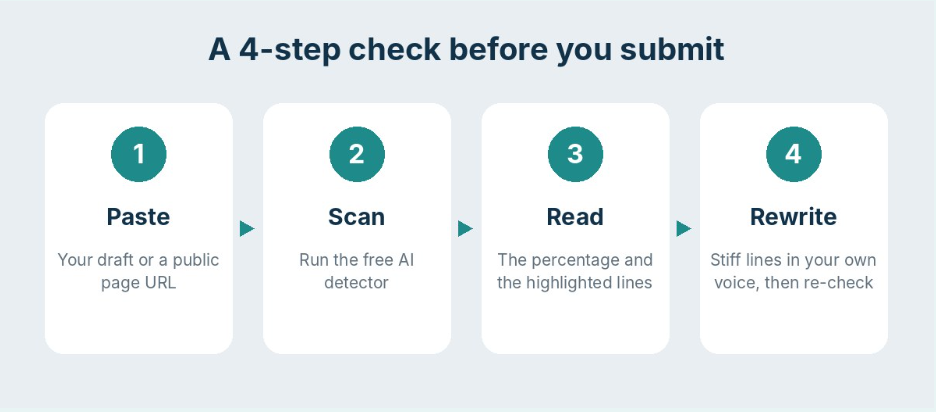
- Finish the draft first. Checking half-written text gives you a noisy result.
- Paste it into the AI checker, splitting it into chunks if it is over the word limit.
- Skip the headline number for a moment and read the highlighted lines.
- Rewrite those lines in your own voice. Add a specific example, cut the filler transition, vary the sentence length, or take a clear position.
- Run the check again and save a copy of each version.
That last step matters more than it looks. If anyone ever questions your work, a trail of drafts is much stronger evidence than any score.
How to Read Your AI Score
An AI percentage is the share of the prose that reads like model output. It is not the probability that you cheated. A score of 40% means a large part of the draft still sounds generated, not that there is a 40% chance of a misconduct case.
| Score | What It Means | What to Do |
|---|---|---|
| Under about 20% | A weak signal; plenty of fully human writing lands here | Don’t read it as a clean pass or a problem |
| 20% to 50% | Mixed; some passages read flat | Read the draft out loud and revise the stiff parts |
| Over 50% | Most of the draft still reads as if a model wrote it | Keep your facts and research, and change the voice |
There is no official “safe” percentage. Your school’s or client’s policy is the rule that counts, and chasing 0% on honest writing is a waste of time.
Why Different AI Checkers Give Different Numbers
Run the same paragraph through three tools, and you will likely get three scores. Each detector uses its own model, training data, and thresholds, and none of them copies another’s number. One tool might flag a passage at 70% while another puts it at 25%.
Use one tool consistently to track your own revisions, and do not treat a screenshot from one dashboard as proof against another. The trend across your drafts tells you more than any single result.
Who Gets False Positives Most Often?
Some writing is more likely to be flagged even when a person wrote every word:
- Writers working in a second language, whose careful, even sentences can look machine-made
- Formulaic academic writing, such as lab reports and literature reviews
- Very short passages, where there is too little text for a reliable reading
- Text written to a strict template, such as product descriptions
If you are in one of these groups, use the highlights to vary your rhythm rather than panicking over the number, and keep your drafts and notes.
What Free AI Detectors Can’t Do
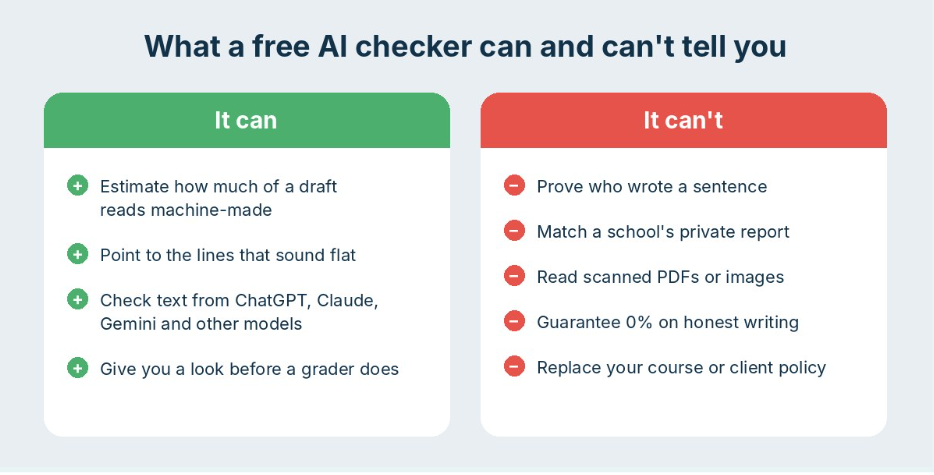
Even the best free AI detector has limits:
- It cannot prove who wrote a sentence.
- It will not reproduce your school’s private report.
- Most tools cannot read scanned PDFs, slides, or images, so paste the text instead.
- None of them can promise a 0% score on honest work.
- None of them replace your course or client policy.
Treat the result as a second opinion on your writing, not a verdict.
Frequently Asked Questions
Is there a completely free AI detector?
Yes. Several AI checkers offer free scans with no account. The differences are in word limits, whether lines are highlighted, and whether a plagiarism check is included.
Can a ChatGPT detector catch text I edited?
Sometimes. Light edits often leave the original patterns in place, while a thorough rewrite in your own voice usually lowers the score. Detectors read style, so the more of your own thinking and phrasing is in the draft, the less it reads like a model.
Will a free AI checker show the same score as Turnitin?
No. Public tools and campus tools use different methods, so the numbers will not match. A public check is useful for spotting weak passages, not for predicting an exact score.
Is it safe to paste my essay into an AI content detector?
Check the tool’s privacy policy first. Some score text in your browser and keep history only on your device, while others store submissions. Never paste passwords, personal data, or confidential work documents.
The Bottom Line
A free AI detector will not make you a better writer, and it will not prove anything about who wrote your work. What it does well is show you which lines still sound generated, so you can fix them before someone else reads them. Write in your own voice, run the check, revise the highlighted parts, and keep every version.
