

Image search techniques are methods for finding pictures, identifying what appears in an image, discovering similar visuals, or tracing an image back to its source. Depending on what you have and what you want to find, you can search using keywords, an uploaded picture, an object within an image, visible text, colors and patterns, faces, hidden file data, the page around an image, or a combination of text and images.
The eleven core image search techniques are keyword search, reverse image search, visual similarity search, OCR-based search, color search, pattern search, object and region search, facial recognition, metadata and EXIF search, context-based search, and multimodal AI search.
The important part is choosing the right method. Reverse image search is useful when you need the source of a photo, while visual similarity works better when you want something that simply looks similar.
This guide explains how each image search technique works, when to use it (and when not to), which tools fit each task, how to check whether an image is real or AI-generated, why searches sometimes fail, and what is actually changing in visual search in 2026.
Image Search Techniques at a Glance
If you only read one section, read this one.
- Have words, not a picture? Use keyword-based image search in Google Images or Bing Images.
- Need to know where a photo came from? Use reverse image search in Google Lens or TinEye.
- Want things that look similar? Use visual similarity search in Google Lens or Pinterest Lens.
- Need the text inside a picture? Use OCR-based search with Google Lens.
- Care about one item in a busy photo? Crop to it with object and region search.
- Checking if a photo is real or AI-made? Combine reverse search, Google’s “About this image,” and EXIF data.
- Want “this, but different”? Use multimodal search: an image plus a text instruction.
- Building search into a product? Use an API such as Google Cloud Vision or Amazon Rekognition.
Here is the quickest way to choose:
| If you want to… | Technique to use |
|---|---|
| Find pictures from a description | Keyword image search |
| Find where a picture came from | Reverse image search |
| Find pictures that look similar | Visual similarity search |
| Read or translate text inside an image | OCR-based search |
| Find images in a specific color palette | Color search |
| Find repeating designs or textures | Pattern search |
| Identify one item inside a larger photo | Object and region search |
| Match or verify a face where lawful | Facial recognition |
| Check when and where a photo was taken | Metadata and EXIF search |
| Understand what an image means on a page | Context-based search |
| Search with a picture plus instructions | Multimodal AI search |
You don’t need all eleven techniques for every search. Start with the method that matches your goal, then combine techniques if the first search does not give you enough information.
What Is Image Search?
Image search is the process of finding visual information through a search engine, database, or AI system, using text, an image, or both as the query.
Traditional image search relies heavily on text associated with an image, such as its filename, caption, and surrounding page content. Modern visual search can also analyze the image itself, which lets systems recognize objects, read text, compare visual characteristics, and understand what a picture is about.
This creates two broad approaches:
- Text-to-image retrieval: You enter words, and the system finds relevant existing images.
- Image-to-information retrieval: You provide an image, and the system finds copies, similar visuals, objects, products, text, or other information connected to it.
Image Search vs Text Search
Text search matches your words against words on web pages. Image search can skip the words entirely. That makes it ideal when you don’t know what something is called, such as a chair you saw in a café or a plant on your hike. In that sense, most image search techniques are really picture identification techniques: ways to find, verify, and understand visual content when words fall short.
Image search also handles things text search can’t express well. A pattern, a mood, a color palette, or the exact look of a product is hard to put into words, but easy to show with a picture. On the other hand, text search is still better for abstract ideas, specific facts, and anything that has no clear visual form. The best searchers use both, and modern image search techniques increasingly let you combine them in a single query.
How Image Search Actually Works
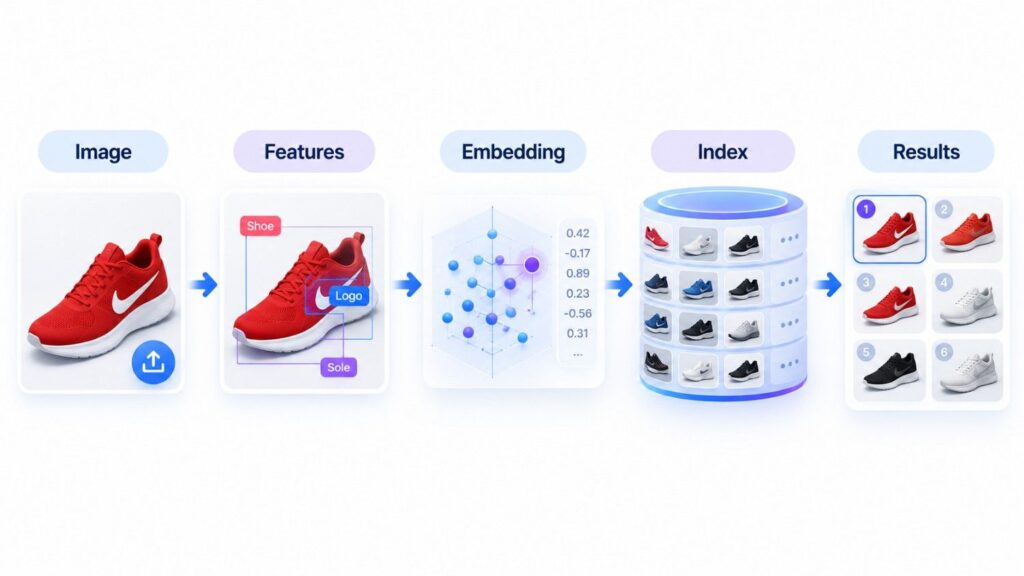
A computer does not see an image the way a person does. It sees a grid of pixel values and has to turn that grid into something it can compare.
From Pixels to Embeddings
Early computer vision used handcrafted feature detectors. SIFT and SURF found distinctive points such as corners and edges that stay recognizable even when an image is resized or rotated.
Deep learning changed the field. Convolutional neural networks (CNNs), and later vision transformers, learned useful features directly from millions of images. Today, most systems turn each image into an embedding: a long list of numbers that captures what the image looks like and what it contains.
This family of methods is called content-based image retrieval (CBIR). It searches by what is inside the image itself, rather than only by the tags and text attached to it.
Image Indexing and Matching
Search engines run the same process on billions of images ahead of time and store the results in an index. This is called image indexing.
When you search with a picture, the system:
- Converts your image into an embedding.
- Compares it with stored embeddings using fast “nearest neighbor” search.
- Measures closeness, often with cosine similarity, where vectors pointing in a similar direction mean similar images.
- Re-ranks the closest matches using signals such as page content, freshness, and your query.
That is why modern image search goes far beyond simple pixel matching. It can find a resized, recolored, or slightly cropped copy because the meaning of the image stays close, even when the pixels change.
The Four Main Signals Behind Image Search
Different systems use different designs, but four broad types of information explain how visual results are chosen.
- Visual content: Shapes, textures, colors, objects, and their positions in the frame.
- Recognized content: Elements a model can identify, such as objects, products, landmarks, text, logos, or faces, depending on the tool.
- Metadata and page information: Filenames, alt text, captions, structured data, and the text surrounding the image on a web page.
- Query context: The words you add, the region you select, your location, and other signals that reveal what you actually want.
This is why two people can use the same picture for very different searches. One might want to identify the product in it, while another wants to know where the photograph first appeared.
The 11 Core Image Search Techniques
Different sources group image search techniques in slightly different ways. Here, each technique is defined by the actual job it does for you.
1. Keyword-Based Image Search
Keyword-based image search finds pictures by matching the words you type against titles, filenames, alt text, captions, and the text around images on web pages.
How it works: You type a description into Google Images or Bing Images. The engine looks for images whose surrounding information matches your words, then ranks them alongside other relevance signals.
Example: “Minimalist home office with wooden desk” returns far more useful results than “office.”
Best for: Stock photos, research, concept visuals, news images, and any time you don’t already have a reference picture.
Tools: Google Images, Bing Images, Unsplash, Adobe Stock, and other image libraries.
Pro tip: Add color, material, angle, and style. “Black leather shoulder bag with gold chain, side view” gives the engine much more to work with than “bag.” If you are running general searches too, it helps to know when to search Google or type a URL directly.
When not to use it: When the image you need has never been described in words. Keyword search can only find what someone has already labeled.
2. Reverse Image Search
Reverse image search lets you upload an image or paste its URL to find the same or similar copies online and trace where the image came from.
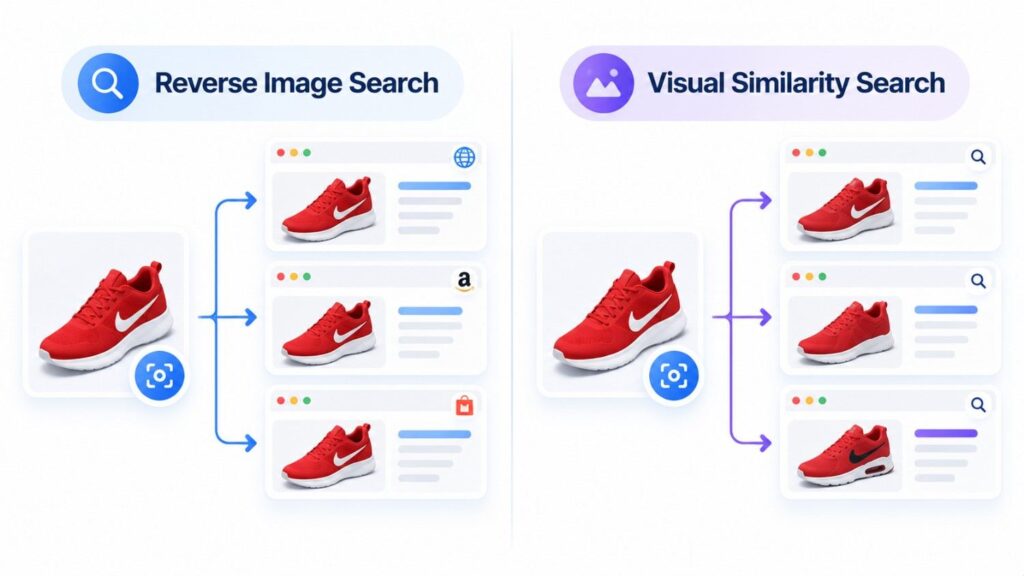
How it works: The tool creates a digital fingerprint of your image and compares it against its index. TinEye, for example, says it has indexed over 77 billion images and matches whole images and their altered versions rather than keywords.
Example: A journalist receives a viral photo. A reverse image search shows it was first posted years earlier in a completely different context.
Best for: Source investigation, fact-checking, finding higher-quality versions, spotting fake profiles, and tracking reuse of your own images.
Tools: Google Lens, TinEye and Bing Visual Search.
Pro tip: Run important searches in more than one tool. Each engine has its own index, so one may find what another misses.
When not to use it: When you need permission to use an image. Reverse search shows where an image appears, not who owns it or whether you can reuse it. That is a licensing question.
Reverse Image Search vs Visual Similarity Search
These terms are often used interchangeably, but they answer different questions.
- Reverse image search asks: “Where else does this exact image appear?”
- Visual similarity search asks: “What else looks like this?”
If you need the source of a photograph, start with reverse search. If you want another chair with the same style, use similarity search.
3. Visual Similarity Search
Visual similarity search finds images that look alike in style, shape, color, or composition, even when they are completely different photos.
How it works: The system compares learned embeddings instead of looking for an exact duplicate. Images whose embeddings sit close together are shown as related results. This is the technique to use when you want to search for images in the same style as one you already have.
Example: A shopper uploads a photo of a mid-century armchair and sees similar chairs from different brands.
Best for: Fashion, home décor, product recommendations, design inspiration, and mood boards.
Tools: Google Lens, Pinterest Lens, and visual search features in shopping apps.
When not to use it: When you need the original file. Similarity results can bury the source under hundreds of lookalikes, so use reverse search for that job.
4. OCR-Based Image Search
OCR-based image search reads the text inside a picture, such as signs, menus, labels, or screenshots, and turns it into searchable, copyable text.
How it works: OCR (optical character recognition) detects letters and converts them into machine-readable text. That text can then be searched, copied, or translated. The open-source Tesseract engine, for example, recognizes more than 100 languages.
Example: Point Google Lens at a menu in another language, select the text, and translate it without typing a word.
Best for: Screenshots, product labels, scanned documents, receipts, signs, and translation.
Tools: Google Lens, Microsoft and AWS document tools such as AWS Textract, and Tesseract.
When not to use it: On blurry photos, low-contrast images, unusual fonts, or messy handwriting. Accuracy drops quickly when the text is hard to read.
5. Color-Based Image Search
Color-based image search filters or finds images by their dominant colors, tones, and palettes.
How it works: The system measures the colors in each image and lets you filter by them. Google Images and Bing Images both offer color filters in their search tools.
Example: A brand team searches for “blue gradient background” and filters to images that match its brand palette.
Best for: Graphic design, branding, mood boards, and interior design.
When not to use it: When the subject matters more than the palette. A blue ocean and a blue jacket share colors but have nothing else in common.
6. Pattern-Based Image Search
Pattern-based image search finds images with similar repeating designs, textures, or surface details.
How it works: The system focuses on texture and repetition rather than the overall object, so it can match a fabric print or a tile design across different products.
Example: A designer uploads a geometric wallpaper and finds fabrics and prints with a similar structure.
Best for: Textiles, fashion design, surface design, and graphic patterns.
When not to use it: For general subjects. Pattern matching works best in narrow, design-focused catalogs, so use visual similarity for everything else.
7. Object and Region-Based Search
Object and region-based search lets you select one item inside an image and search for just that item instead of the whole picture.
How it works: Object detection finds items in the scene, and you adjust a selection box around the one you care about. Google Lens and Bing Visual Search both let you change the selected area.
Example: In a photo of a living room, you select only the lamp and get shopping results for that lamp.
Best for: Shopping, identifying plants and animals, landmarks, and busy scenes with many objects.
When not to use it: When your selection is loose or wrong. If the box includes several items, the search may lock onto the wrong one, so crop tightly.
8. Facial Recognition Search
Facial recognition search compares the features of a face against other faces to verify identity or find matching photos.
How it works: A model maps facial characteristics into a numerical template and compares it with stored templates.
Best for: Authorized identity verification, account security, access control, and organizing your own photo library.
Important caution: This is the most sensitive technique on this list. Biometric data is protected by privacy laws in many places, and searching for strangers by face can raise serious legal and ethical problems. Mainstream tools reflect this. TinEye does not perform facial recognition at all. Accuracy also varies with lighting, pose, age, and image quality.
When not to use it: Whenever consent, privacy law, or platform rules apply, which is most of the time.
9. Metadata and EXIF Search
Metadata and EXIF search uses the hidden data stored inside an image file, such as capture date, camera model, and GPS location, to find, sort, or verify photos.
How it works: Most cameras and phones write EXIF (Exchangeable Image File Format) data into a photo at the moment it is taken. Tools can read that data, and photo libraries can use it to sort and search images.
Example: A fact-checker reads a photo’s EXIF data and finds the capture date is two years before the event it supposedly shows.
Best for: Verification, photo archives, copyright evidence, and checking what your own photos reveal before you post them.
When not to use it: On screenshots, edited exports, or images saved from social media, which often have their metadata removed. We cover EXIF in more detail in the verification section below.
10. Context-Based Image Search
Context-based image search uses the page around an image, such as headings, captions, and nearby text, to understand what the image means.
How it works: The same picture of a laptop might be about technology on a tech blog and about a product on a shopping site. Search engines read that surrounding context to decide which searches the image should appear for.
Best for: Understanding why an image ranks, and publishing images that are easy for search engines to understand.
When not to use it: On images with no surrounding text. With nothing to read, there is no context to use.
11. Multimodal and AI Image Search
Multimodal image search combines a picture with text, and sometimes voice, so you can show what you mean and explain what you want in a single search.
How it works: The image tells the system what “this” looks like, while your words tell it what to change or what to answer. Google Lens supports this with its “Add to your search” option, and Google’s AI Mode lets you snap or upload a photo, ask a question about it, and get a full answer with links.
Example: Upload a photo of a sofa and add “like this, but dark green and smaller for an apartment.”
Best for: Shopping, product discovery, research, homework help, and complex visual questions.
When not to use it: When you need a predictable, exact match. AI answers can vary, and for source tracing a plain reverse image search is more reliable.
Image Search Techniques Comparison
| Technique | Input | Main Strength | Main Limitation | Best Use |
|---|---|---|---|---|
| Keyword | Text | Broad discovery | Depends on existing labels | Research |
| Reverse image | Image | Finds copies and sources | Heavily edited images are harder to trace | Verification |
| Visual similarity | Image | Finds lookalikes | Similar look may not mean same subject | Discovery |
| OCR | Image with text | Extracts searchable text | Poor input lowers accuracy | Documents and signs |
| Color | Image or filter | Palette matching | Ignores subject | Design |
| Pattern | Image | Texture matching | Narrow use | Textiles |
| Object and region | Selected area | Focused identification | Needs a good selection | Shopping |
| Facial recognition | Face | Identity comparison | Privacy, legal, and accuracy concerns | Authorized verification |
| Metadata and EXIF | Image file | Date, device, location clues | Often stripped or edited | Verification |
| Context-based | Image plus page | Meaning and intent | Needs surrounding text | Publishing |
| Multimodal | Image plus text | Richest intent | Results can vary | AI search |
How to Choose the Right Image Search Technique
Choosing between image search techniques comes down to two questions.
1. What do you have? Words, a whole image, one object in an image, text inside an image, the original file, or an image plus instructions?
2. What do you want to find? The original source, an exact copy, something that looks similar, the name of an object, the text, the capture date, or an answer to a question?
Match your answers to a technique:
- Only words? Start with keyword search.
- A photo, and you need its source? Start with reverse image search.
- A photo, and you want alternatives? Use visual similarity search.
- One object matters? Crop to it with region search.
- Text in the picture? Use OCR.
- The original file and a date to check? Read the EXIF data.
- A picture plus “but different”? Use multimodal search.
Picking the right query type matters more than repeating the wrong search in a different tool. When one of these image search techniques stalls, switch to the next one on the list instead of trying the same search again.
How to Search by Image, Step by Step
Many people simply want to know how to search an image instead of words. Here is how to do a search by image on each device, based on Google’s own instructions.
On a Computer
- Go to Google Images and click the camera icon (Search by image).
- Upload a file, drag an image into the search box, or paste an image link.
- Review the results: related websites, similar images, and identified objects.
- Adjust the selection box if you only care about one item.
In Chrome, it is even faster. Right-click any image on a web page and choose Search with Google Lens. Results open in a side panel, so you never leave the page.
On Android
- Google app: Tap the Lens icon in the search bar, then take or upload a photo.
- Chrome: Touch and hold an image on a website and choose Search image with Google Lens.
- Circle to Search: On supported phones, touch and hold the home button or navigation handle, then circle, highlight, scribble on, or tap whatever you want to search. It works on top of almost any app.
On iPhone
- Google app: Tap the Lens icon, or touch and hold an image on a website and tap Search inside image.
- Chrome: Touch and hold an image and tap Search image with Google. Google notes this requires Google as your default search engine.
On TinEye
- Go to tineye.com.
- Upload an image, drag it in, or paste an image URL.
- Sort the results by “Oldest” to find the earliest known appearance, or by “Biggest image” to find a higher-quality copy.
TinEye’s sorting options make it one of the fastest ways to trace a photo’s history.
Refine with “Add to Your Search”
After the image is analyzed, tap Add to your search and type extra details. For example, search a photo of running shoes and add “waterproof.” The results now use both the picture and your words.
Other tools work the same way. In Bing Images, select the camera icon to drag in, upload, or paste an image. In Pinterest, tap the camera in the search bar to use Pinterest Lens.
How to Check if an Image Is Real, Edited, or AI-Generated
This is one of the biggest reasons people use image search in 2026, and it rarely depends on a single tool. Verification works best when you combine several image search techniques. Here is a reliable process.
Trace It with Reverse Search
Start with reverse image search in Google Lens and TinEye. Look for the earliest appearance, credible publishers, and versions that look less edited or higher in quality. If the image appeared long before the event it claims to show, you have your answer.
Use “About This Image”
Google’s About this image tool shows when Google may have first seen a similar version of an image, earlier pages that used it, and how other sites describe it. On Android, you can open it from Circle to Search, and on Android or iPhone, from Google Lens: run a search, swipe up, and tap About this image.
Look for Content Credentials and SynthID
Google uses C2PA Content Credentials, an industry standard for recording how a file was made and edited, to show in About this image whether a picture was created or edited with AI tools. It can also flag images carrying SynthID, Google DeepMind’s invisible watermark for AI-generated content. An AI Image Detector can provide an additional check when reviewing images for possible AI generation or modification.
Keep the limits in mind. Google itself warns that credit and source metadata can be modified by editing tools, and many AI images carry no label at all. A missing label proves nothing.
Read the EXIF Data
EXIF data can contain:
- The device that took the photo
- Exposure settings, such as ISO and shutter speed
- The date and time of capture
- Location coordinates, when location services were on
- The software used to edit or export the file
- Author and copyright details, when the photographer added them
Tools to read it:
- ExifTool: The command-line reference tool for reading metadata, ideal for batch or forensic work.
- Jeffrey’s Image Metadata Viewer: A free web tool that reads metadata from an uploaded file or an image link, with nothing to install.
- Jimpl: A simple web viewer that also helps you check what your own images reveal before you publish them.
The limitation: EXIF is a claim the file makes about itself. Anyone can rewrite a date or location with the same tools that read it, and images saved from social media often have no EXIF at all. Treat it as supporting evidence, never as proof on its own.
A Real Verification Workflow
Imagine a journalist receives a dramatic flood photo supposedly taken during a recent disaster. A sensible check looks like this:
- Reverse image search: Did the same or a similar image appear online before the event?
- Try another index: A second tool may surface different pages or versions.
- About this image: When did Google first see it, and is there an AI label?
- Region search: Isolate a landmark, storefront, or bridge to confirm the location.
- OCR: Read any signs or building names in the frame.
- EXIF: If the original file is available, check the capture date and location.
- Keyword search: Compare the photo with credible reporting on the event.
- Cross-check: Decide whether the date, place, and details all support the claim.
Each step answers a different question. That is why serious image verification is a workflow, not a single button.
Best Image Search Tools in 2026
The best tool depends on whether you are an everyday user or a developer, and on which image search techniques you need most.
For Everyday Searches
| Tool | Best For | Key Strength | Watch Out For |
|---|---|---|---|
| Google Lens / Google Images | General use | Huge reach, text refinement, AI answers | Can favor similar results over the exact source |
| TinEye | Finding exact copies | 77+ billion indexed images, tracks altered versions | No facial recognition or object search |
| Bing Visual Search | Shopping and objects | Region selection, pages using the image | Smaller reach than Google |
| Pinterest Lens | Ideas and inspiration | Style and décor discovery | Not built for verification |
| Yandex Images | A second opinion | A different index from Google and Bing | Results vary by region |
Google Lens is the most widely used visual search tool. Google says people use Lens for nearly 20 billion visual searches every month, and about 20% of those are shopping-related.
TinEye launched in 2008 and remains the specialist for finding where an exact image appears, including resized and edited versions.
Bing Visual Search lets you drag in, upload, or paste an image, or use a webcam. Results include pages using the image, related images, and products.
Pinterest Lens connects what your camera sees to ideas on Pinterest, which makes it strong for fashion, décor, and recipes.
No single engine indexes everything. For important verification work, checking more than one system gives you stronger evidence.
For Developers
If you need image search inside your own product, catalog, or moderation pipeline, you need an API rather than a website.
Google Cloud Vision API: Its Web Detection feature works like reverse image search over an API. It returns full matching images, partial matches, pages that contain the image, visually similar images, and best-guess labels. It also offers label, logo, landmark, and text detection. The first 1,000 units of each feature per month are free.
Amazon Rekognition: AWS’s image and video analysis service. It detects objects and scenes, compares faces against your own collection, extracts text, flags unsafe content, and supports Custom Labels for recognizing your own products. You pay only for what you analyze.
Open-source and vector search: Tesseract handles OCR, and vector databases such as Pinecone and Weaviate store the embeddings that power similarity search.
Choose the stack based on the actual job, whether that is similarity search, OCR, object detection, or multimodal retrieval, rather than treating every vision API as interchangeable. For products that need visual search built around a specific catalog or workflow, custom AI development is often the better path than forcing a generic tool to fit.
What’s Changing in Image Search in 2026
The biggest shift is from separate search modes toward tools that understand pictures and language together. These are the real changes behind that shift.
Circle to Search Puts Image Search on Top of Every App
Google launched Circle to Search in January 2024. You no longer need to screenshot and upload. You simply circle, highlight, or tap anything on your screen. By October 2024, Google said it was available on more than 150 million Android devices.
AI Mode Answers Questions About Your Photos
In April 2025, Google brought Lens into AI Mode. You can snap or upload a photo, ask a question, and get a detailed answer with links. Google says AI Mode analyzes the whole scene and runs multiple searches about the image and the objects in it, a method it calls “query fan-out.”
Lens Now Understands Video and Voice
Since October 2024, Lens can search with video and lets you ask questions out loud while pointing your camera. You can film something moving and ask why it is happening.
Image Search Is Built into the Browser
Lens is built into Chrome on desktop, so you can search any image from a right-click menu without opening a new tab.
AI-Generated Images Are Getting Labels
With C2PA Content Credentials and SynthID support in About this image, search tools are starting to tell you whether an image was made or edited with AI. Coverage is still incomplete, but verification is becoming part of everyday image search.
The Technique Is Becoming Invisible
Put together, these changes point in one direction. Instead of choosing between keyword search, reverse search, and object recognition, you increasingly show a picture and explain what you want. The tool picks the technique for you. Understanding image search techniques still helps, because it tells you which answer to trust and when to double-check.
Image Licensing: What “Free to Use” Really Means
Finding an image is not the same as having permission to use it. An image you can download for free may still be off-limits for your website, ads, or products.
Most freely reusable images online use a Creative Commons licence. Here is what each one allows, according to Creative Commons:
| Licence | Commercial Use | Can You Modify It | Credit Required |
|---|---|---|---|
| CC0 (public domain dedication) | Yes | Yes | No |
| CC BY | Yes | Yes | Yes |
| CC BY-SA | Yes | Yes, but share under the same licence | Yes |
| CC BY-ND | Yes | No | Yes |
| CC BY-NC | No | Yes | Yes |
| CC BY-NC-SA | No | Yes, but share under the same licence | Yes |
| CC BY-NC-ND | No | No | Yes |
How to Use the Usage Rights Filter Correctly
- In Google Images, open the filter or tools menu and choose Usage rights.
- Pick Creative Commons licenses or Commercial & other licenses.
- Treat the results as a shortlist, not permission.
- Open the page where the image actually lives and read its licence there.
- Record the creator, licence type, licence link, and source page.
Google itself says to always confirm an image’s licence with both the licence provider and the image’s host site. When the details conflict or are missing, choose a different image.
Practical Applications of Image Search
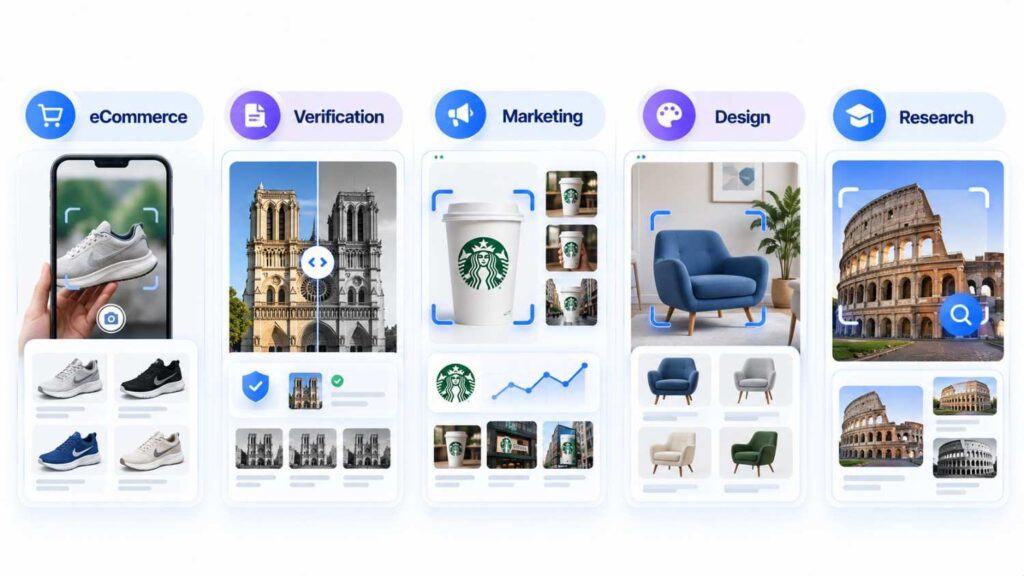
Different industries rely on different image search techniques, often combined.
| Industry | Techniques Used | What It Delivers |
|---|---|---|
| eCommerce | Object recognition, visual similarity, multimodal | Shoppers search with a photo instead of guessing product names |
| Journalism and fact-checking | Reverse search, About this image, EXIF | Misattributed or AI-made images caught before publication |
| Marketing and brand protection | Reverse search, monitoring alerts | Unauthorized use of brand images found early |
| Design and creative work | Visual similarity, color, pattern | Inspiration when words can’t describe a style |
| Education and research | OCR, object search, keyword | Text from scans, identified objects, sourced visuals |
| Legal and IP | Reverse search, metadata | Proof of where your images were copied, for takedown requests |
How the Biggest Platforms Built Visual Search
Visual search is no longer experimental. Major companies have published how they built it in peer-reviewed papers at the ACM KDD conference:
- Pinterest: “Visual Search at Pinterest” (KDD 2015)
- eBay: “Visual Search at eBay” (KDD 2017)
- Alibaba: “Visual Search at Alibaba” (KDD 2018)
- Microsoft: “Web-Scale Responsive Visual Search at Bing” (KDD 2018)
- Amazon: “Amazon Shop the Look: A Visual Search System for Fashion and Home” (KDD 2022)
These papers are worth reading if you are planning visual search for your own product. They show the same building blocks covered in this guide, including feature extraction, embeddings, object detection, and fast similarity search, running at the scale of millions of products and users.
The common thread is that visual search is now standard infrastructure for large marketplaces, which is why these techniques matter commercially and not only technically.
Image SEO: How to Get Your Images Found
Image search works in both directions. Users want to find images, and publishers want their images to be found. If SEO image search is your goal, these practices come straight from Google’s own guidance.
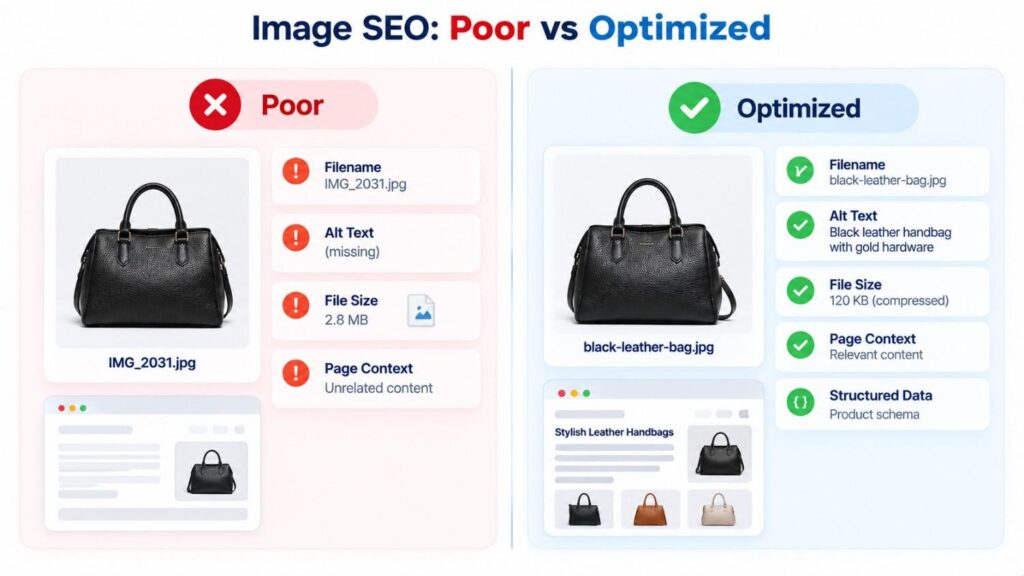
Use descriptive filenames. black-leather-crossbody-bag.jpg tells search engines far more than IMG_2031.jpg.
- Write useful alt text. Describe the image naturally for people using screen readers. Google advises against stuffing alt text with keywords.
- Place images near relevant text. The page title, headings, and nearby paragraphs help search engines understand what an image shows.
- Use standard image elements. Google can find images in standard HTML
imgelements, but not images loaded as CSS backgrounds. - Serve responsive images. Use
srcsetor thepictureelement so each device gets a suitable size. - Use supported, efficient formats. Google supports BMP, GIF, JPEG, PNG, WebP, SVG, and AVIF.
- Submit an image sitemap. It helps Google discover images it might otherwise miss.
- Add structured data where it fits. Product, recipe, and other structured data can earn richer results in Google Images.
- Use original images. Original photos, diagrams, and screenshots offer information that generic stock images cannot.
For the complete checklist, see Google’s image SEO best practices.
Why Image Searches Fail and How to Fix Them
Even the best image search techniques return poor results when a signal is missing or misleading. Here are the most common causes and their fixes.
- Low-quality input. Tiny, blurry, or heavily compressed images contain less detail. Fix: use the original or highest-quality version you can find, not a screenshot of a screenshot.
- Heavy cropping or editing. Crops, filters, overlays, and AI edits can break the match. Fix: search several crops or distinctive regions separately.
- The wrong technique. A similarity search won’t reliably find an original source. Fix: switch to reverse search when you need the source, and to similarity search when you want alternatives.
- Searching the whole scene. Busy photos contain competing objects. Fix: select only the item you care about.
- Relying on one tool. Every engine has its own index. Fix: check at least two tools for anything important.
- Vague keywords. “Car” returns everything. Fix: add model, color, angle, and setting.
- Ignoring filters. Fix: use size, color, type, time, and usage-rights filters to narrow results.
- Skipping the licence check. Fix: confirm the licence on the source page before using any image.
- Trusting one match. Fix: verify important findings with more than one kind of evidence.
Conclusion
Image search has moved far beyond typing a phrase into Google Images. Today’s image search techniques let you find pictures from words, trace a photo to its source, discover lookalike products, read text inside images, check hidden file data, and ask an AI questions about what you see.
Keyword search is still the best starting point for broad discovery. Reverse search investigates existing pictures, visual similarity powers shopping and design, OCR turns visible text into searchable text, region search isolates single objects, and multimodal AI search combines pictures with plain-language instructions.
You don’t need to master every algorithm to search well. Remember one rule: match the technique to the information you already have and the answer you actually need. When one technique reaches its limit, combine it with another.
Frequently Asked Questions
1. What are image search techniques?
Image search techniques are methods for finding, identifying, comparing, or verifying images. The eleven core techniques are keyword search, reverse image search, visual similarity, OCR, color search, pattern search, object and region search, facial recognition, metadata and EXIF search, context-based search, and multimodal AI search.
2. How do I search using a picture?
Open Google Lens in the Google app or click the camera icon in Google Images, then upload or take a photo. On a computer, you can also right-click any image in Chrome and choose “Search with Google Lens.” Add text to refine your results.
3. What is the difference between reverse image search and visual similarity search?
Reverse image search looks for the same image and its copies to find where it appears and where it came from. Visual similarity search finds different images that simply look alike.
4. How do I find the original source of an image?
Run a reverse image search in Google Lens and TinEye, then look for the earliest dated appearance and credible publishers. Google’s “About this image” tool can also show when Google first saw a similar version.
5. How can I tell if an image is AI-generated?
Check Google’s “About this image” for AI labels from Content Credentials or SynthID, run a reverse search to find the original, and read the EXIF data if you have the file. No single check is definitive, and many AI images carry no label, so combine methods.
6. Can ChatGPT do a reverse image search?
Not in the way TinEye or Google Lens does. ChatGPT can describe an uploaded image and can search the web for information, but it does not trace exact copies of an image across the internet. Use a dedicated reverse image search tool for that.
7. What is better than TinEye?
It depends on the job. TinEye is excellent for exact copies and edited versions. Google Lens has far broader reach and finds similar images, products, and context. For important searches, use both.
8. Can I search for a person by photo?
Technically, some tools offer face search, but it raises serious privacy and legal concerns, and many tools restrict it. TinEye does not do facial recognition. Reverse searching a profile photo to check for a fake account is a safer, more common use.
9. Why doesn’t reverse image search find my picture?
The image may not be indexed by that tool, or it may be heavily cropped, edited, compressed, or only available behind a login. Try a higher-quality copy, search distinctive regions separately, and use more than one tool.
10. What is EXIF data?
EXIF data is information a camera or phone stores inside a photo, such as the device model, settings, capture date, and sometimes GPS location. You can read it with tools like ExifTool, Jeffrey’s Image Metadata Viewer, or Jimpl.
11. Can I use Creative Commons images for business?
Sometimes. CC0, CC BY, CC BY-SA, and CC BY-ND allow commercial use, while any licence with “NC” does not. Always read the licence on the image’s source page.
12. What is OCR-based image search?
OCR-based image search reads the text inside a photo, screenshot, or scan and turns it into text you can search, copy, or translate.
13. What is the best image search API for developers?
Google Cloud Vision is the closest to reverse image search through an API, thanks to its Web Detection feature. Amazon Rekognition is a strong choice for high-volume analysis, face comparison against your own collection, and video. If you already use one cloud provider, starting there is usually simplest.
14. What is visual search?
Visual search is searching with an image instead of, or alongside, words. Google Lens, Bing Visual Search, and Pinterest Lens are the most common visual search tools, and they rely on several of the image search techniques in this guide, including reverse search, visual similarity, object search, and OCR.
15. How do I search for images in the same style?
Use visual similarity search. Upload your reference image to Google Lens or Pinterest Lens, then browse the visually similar results. Adding words such as “minimalist” or “watercolor” can narrow the style even further.
16. What is content-based image retrieval (CBIR)?
Content-based image retrieval is the technical name for searching by what is inside an image, such as its colors, shapes, and objects, instead of only by the tags and text attached to it. Most modern reverse image and similarity search tools are built on CBIR.
17. Which image search techniques work best for online shopping?
Object and region search, visual similarity search, and multimodal search work best. Select the product in a photo, browse similar items, and add details like color, size, or budget to narrow the results.
