
Every new app, client, or business unit used to get its own database. That works fine when you have three of them. When you have three hundred, it turns into a full-time job of patching, upgrading, backing up, and paying for servers that sit half idle.
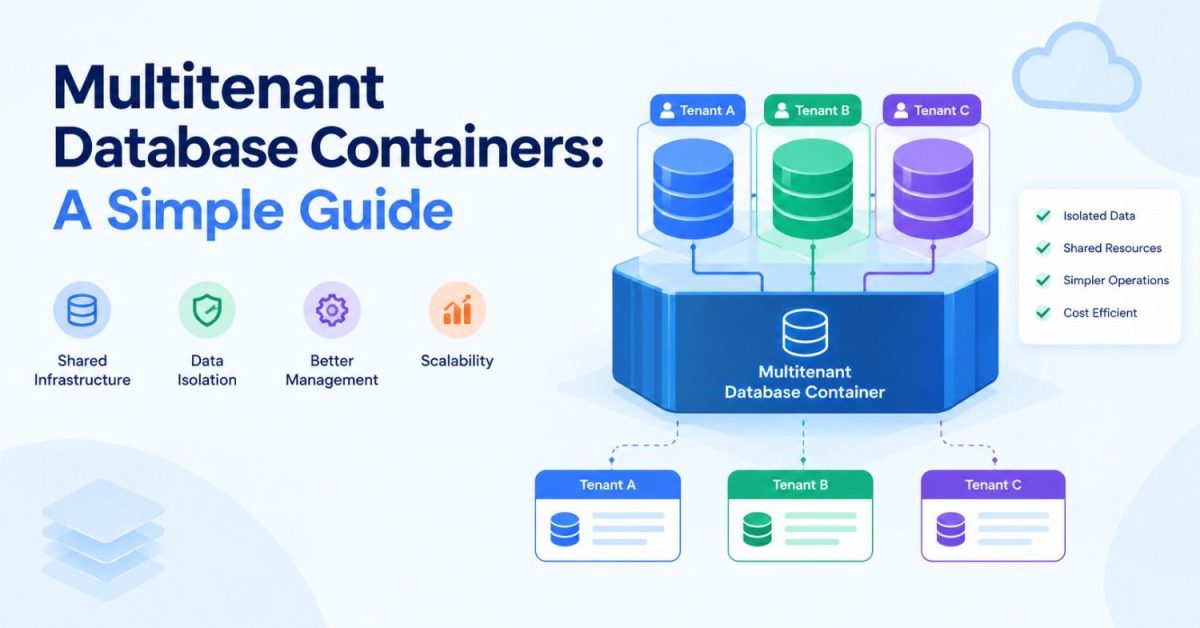
Multitenant database containers solve this by letting many separate databases, called tenants, run inside one shared database system. Each tenant keeps its own data, users, and settings, while the hardware, memory, and system software are shared.
One quick note before we start. The name sounds close to an application client container, but that is a Java EE component that runs client-side programs. It has nothing to do with storing data.
This guide explains what multitenant databases are, how SAP HANA, Oracle, Azure SQL, and Kubernetes handle them, and when you should (or should not) use them.
What Are Multitenant Database Containers?
A multitenant database container is one database system that hosts several isolated databases at the same time. Each isolated database is a tenant.
Think of it like an apartment building. The building has one foundation, one water supply, and one electricity connection. But every apartment has its own door, its own lock, and its own furniture. Residents share the building, not their living rooms.
In the same way:
- The building is the database system (the container).
- The apartments are the tenant databases.
- The shared utilities are CPU, memory, storage, and the database software itself.
To an application, a tenant looks and behaves like a normal standalone database. It connects, runs queries, and stores data without knowing other tenants exist on the same system.
The term is most often linked with SAP HANA, which calls its setup “multitenant database containers” (MDC). Oracle uses a similar idea under the name Oracle Multitenant, and cloud platforms like Azure SQL offer their own versions.
Why Traditional Databases Start Becoming a Problem
In the classic setup, each application or customer gets a dedicated database, often on a dedicated server. At first, this feels clean and simple.
As the business grows, the cracks start to show. You end up managing:
- Dozens or hundreds of separate installations
- Separate patches and upgrades for each one
- Servers that are busy at noon and idle at midnight
- Separate monitoring, alerting, and backup jobs
Every upgrade has to be repeated many times. Every new customer means a new server request. And most of that hardware runs well below its capacity.
Here is how the two approaches compare:
| Feature | Traditional (One Database per App) | Multitenant Database |
|---|---|---|
| Setup | Separate installation for each app or customer | Many tenants inside one system |
| Hardware use | Often underused | Shared and better utilized |
| Upgrades | Repeated for every database | Applied once at the system level |
| Adding a tenant | New install, often new server | One command on the existing system |
| Monitoring | Many separate tools and dashboards | Central view of all tenants |
| Isolation | Physical, very strong | Logical, depends on the model and controls |
This is why many SaaS companies and enterprise IT teams moved to multitenant database containers.
How Multitenant Database Containers Work in SAP HANA
SAP HANA is where the term “MDC” comes from, so it is the best place to start.
System Database vs Tenant Databases
An SAP HANA multitenant system always has two kinds of databases:
- System database (SYSTEMDB): This is the control room. Administrators use it to manage the whole system, create and delete tenants, set resource limits, and run system-wide backups. It does not hold business application data.
- Tenant databases: These hold the actual application data. Each tenant has its own users, its own database catalog, its own data and log files, and its own backups.
All tenants share the same SAP HANA installation and system software. That means one upgrade covers every tenant at once.
A Short History
SAP introduced multitenant database containers in SAP HANA 1.0 SPS 09 in 2014. At that time, it was optional, and many systems still ran in single-container mode.
That changed with SAP HANA 2.0 SPS 01 in 2017. From that release, multitenant mode became the only supported operating mode. Single-container systems are converted to a system database plus one tenant database during the upgrade (SAP Note 2423367).
So if you run SAP HANA 2.0 today, you are already using multitenant database containers, even if you have only one tenant.
Creating, Stopping, and Removing a Tenant
Tenant management happens from the system database with plain SQL. Here is a simple example:
-- Create a new tenant database
CREATE DATABASE TESTDB SYSTEM USER PASSWORD <password>;

-- Stop the tenant
ALTER SYSTEM STOP DATABASE TESTDB;

-- Remove the tenant (it must be stopped first)
DROP DATABASE TESTDB;
No new server, no new installation. The tenant is created inside the existing system.
Backup and Recovery per Tenant
Each tenant can be backed up and recovered on its own. If one tenant has a problem, you can restore just that tenant without touching the others. You can also back up all tenants together from the system database.
Oracle Multitenant: CDB, PDB, Root, and Seed
Oracle uses its own terms for the same idea. These terms are Oracle-specific, so do not expect to see them in SAP HANA or Azure.
- Container database (CDB): The full multitenant system. It holds everything below.
- Root (CDB$ROOT): The central area that stores Oracle-supplied metadata and common users. Administrators manage the whole CDB from here.
- Seed (PDB$SEED): A read-only template. Oracle uses it to create new pluggable databases quickly. You cannot change or drop the seed.
- Pluggable database (PDB): A tenant. To applications, a PDB looks exactly like a normal, standalone Oracle database.
A CDB has exactly one root and one seed, and it can hold zero or more PDBs.
Creating a new PDB from the seed takes one statement:
CREATE PLUGGABLE DATABASE hrpdb
  ADMIN USER dba1 IDENTIFIED BY password;
PDBs are also portable. You can unplug a PDB from one CDB and plug it into another, which makes moving or upgrading tenants easier.
One more important point: starting with Oracle Database 21c, the old non-CDB architecture is desupported. Every new Oracle database is now a container database, just like SAP HANA 2.0 is always multitenant.
Multitenancy in Azure SQL Database
Microsoft takes a more flexible approach. Instead of one fixed design, Azure SQL Database supports several tenancy models for SaaS apps. The two most common are:
- Database per tenant: Each customer gets a separate database. This gives strong isolation and makes per-customer restore easy.
- Elastic pools: Many tenant databases share a pool of compute and storage. This suits SaaS apps where each customer’s usage rises and falls at different times, because idle tenants leave room for busy ones.
Microsoft also documents shared-database models, where many tenants live in the same tables, separated by a tenant ID column. These are cheaper per tenant but offer less isolation. We compare them in a later section.
Containerized Database Setups with Docker and Kubernetes
Not every team uses SAP HANA or Oracle. Many SaaS teams build multitenancy with a containerized database instead, using Docker and Kubernetes.
What Is a DB Container?
A db container is simply a database engine (like PostgreSQL or MySQL) packaged and running inside a container. Here is the simplest possible example with Docker:
docker run -d --name tenant-a-db \
  -e POSTGRES_PASSWORD=secret \
  postgres:16
Each tenant can get its own container, or many tenants can share one database instance with separate schemas.
How Kubernetes Helps
On Kubernetes, databases are usually run as a StatefulSet. A StatefulSet gives each database pod a stable name and its own persistent storage, so data survives restarts and rescheduling.
To keep tenants from hogging resources, teams often place each tenant in its own namespace and attach a ResourceQuota:
apiVersion: v1
kind: ResourceQuota
metadata:
  name: tenant-a-quota
  namespace: tenant-a
spec:
  hard:
    requests.cpu: "2"
    requests.memory: 4Gi
    limits.cpu: "4"
    limits.memory: 8Gi
This sets a hard cap on how much CPU and memory that tenant’s namespace can use. This approach fits naturally into a service-oriented architecture, where each service and tenant is deployed and scaled on its own.
Three Multitenancy Models Compared
No matter which platform you use, multitenant designs usually fall into one of three models. Microsoft’s guide to multi-tenant SaaS database patterns is a good deep dive, but here is the short version:
| Model | How It Works | Isolation | Cost per Tenant | Best For |
|---|---|---|---|---|
| Database per tenant | Each tenant has its own database | High | Higher | Enterprise clients, regulated data |
| Schema per tenant | One database, a separate schema for each tenant | Medium | Medium | Mid-sized SaaS with moderate tenant count |
| Shared tables | All tenants in the same tables, split by tenant ID | Low | Lowest | Large numbers of small tenants |
SAP HANA MDC and Oracle PDBs follow the first model. Each tenant is a real database with its own catalog and users, which is why their isolation is stronger than a shared-table setup.
Many companies also mix models. For example, small customers share tables, while large customers get a dedicated tenant database.
Benefits of Multitenant Database Containers
Teams adopt multitenant database containers because they fix real operational problems, not because they are trendy.
- Lower cost: Fewer servers and installations mean lower hardware and licensing spend.
- Better resource use: Idle capacity from one tenant can be used by another.
- Faster onboarding: A new tenant is a SQL command, not a server project.
- One upgrade for all: Patch the system once, and every tenant gets the update.
- Central management: Monitoring, backups, and security policies are handled in one place.
- Per-tenant control: In MDC and Oracle setups, each tenant can still be backed up, restored, started, or stopped on its own.
Challenges You Should Plan For
Multitenancy is not free of trade-offs. Here are the main ones.
The Noisy Neighbor Problem
Because tenants share CPU, memory, and storage, one tenant running a heavy job can slow down everyone else. This is called the noisy neighbor problem.
The fix is resource governance. SAP HANA lets administrators set limits for each tenant, such as memory and CPU usage. Oracle uses Resource Manager to share CPU between PDBs. Kubernetes uses ResourceQuotas. Per-tenant monitoring is also important, so you can spot a noisy tenant before customers complain.
Shared Upgrade Timing
One upgrade for all is a benefit, but it also means all tenants move to the new version together. If one tenant’s application is not ready, you may need to move it to another system first.
Restore Complexity in Shared Models
In shared-table models, restoring one customer’s data is harder, because their rows are mixed with everyone else’s. Database-per-tenant designs avoid this problem.
Security Best Practices
Multitenant systems can be very secure, but isolation does not happen by default in every model. It depends on how you design and configure it. Follow these practices:
- Use strong access control: Give each tenant its own admin users and never share credentials across tenants.
- Encrypt data at rest and in transit: Use the platform’s built-in encryption and enforce TLS connections.
- Isolate at the right level: Choose database-per-tenant for sensitive data. Use shared tables only when the data risk is low.
- Enforce row-level rules in shared tables: In PostgreSQL, Row-Level Security makes the database itself filter rows by tenant:
ALTER TABLE orders ENABLE ROW LEVEL SECURITY;

CREATE POLICY tenant_isolation ON orders
  USING (tenant_id = current_setting('app.current_tenant')::int);
Note that superusers and table owners bypass these policies unless you also run ALTER TABLE orders FORCE ROW LEVEL SECURITY;, so your app should connect with a normal role.
- Monitor each tenant: Track logins, query volume, and resource use per tenant.
- Test per-tenant restores: A backup you cannot restore for a single tenant is only half a backup.
Real-World Use Cases
SaaS Platforms
SaaS companies serve hundreds or thousands of customers through one product. Multitenant databases let them add customers quickly while keeping each customer’s data separate.
Healthcare
Hospitals and clinic groups can give each department or facility its own tenant. This keeps patient records apart while sharing infrastructure. These systems must still meet regulations like HIPAA, so encryption, access logs, and strict isolation are essential.
Finance
Banks and payment companies handle large volumes of sensitive transactions. Many choose database-per-tenant models for stronger isolation, and their setups must meet standards like PCI DSS.
SAP Landscapes
SAP customers often run several SAP systems or environments, such as development, test, and quality assurance, as separate tenants on one SAP HANA system. This cuts hardware needs while keeping each environment separate.
When You Should Avoid Multitenancy
Multitenancy is not the right fit for every case. Consider a dedicated, single-tenant setup when:
- A contract or regulation requires full physical separation of data and hardware.
- One workload is so large that it would dominate the shared system anyway.
- A customer needs its own upgrade schedule or custom database version.
- The team does not have the tools to monitor and govern resources per tenant.
Conclusion
Multitenant database containers change how we run databases. Instead of giving every app or customer its own server, you run many isolated tenants inside one shared system.
SAP HANA made the idea mainstream with MDC, and it is now the only mode in SAP HANA 2.0. Oracle made the same move with CDBs and PDBs, and Azure SQL and Kubernetes offer flexible versions for SaaS teams.
The key is to pick the right isolation model, set resource limits, and secure each tenant properly. Do that, and you get lower costs, simpler management, and room to grow.
Frequently Asked Questions (FAQs)
What is a multitenant database container in SAP HANA?
It is an SAP HANA system with one system database and one or more tenant databases. The system database handles administration, while each tenant stores its own data, users, and backups. All tenants share the same SAP HANA installation.
What is the difference between a CDB and a PDB in Oracle?
A CDB (container database) is the whole multitenant system. A PDB (pluggable database) is a tenant inside it. Applications connect to a PDB as if it were a normal standalone database.
Are multitenant databases secure?
They can be, but security depends on the model and its setup. Database-per-tenant designs give the strongest isolation. Shared-table designs need extra controls like row-level security, strict access rules, and encryption.
What is a containerized database?
It is a database engine running inside a container, such as a Docker container. On Kubernetes, it usually runs as a StatefulSet with persistent storage.
Can you back up a single tenant database?
Yes. In SAP HANA MDC, each tenant can be backed up and recovered on its own. Oracle PDBs and Azure SQL databases also support backup and restore per tenant.
What is the noisy neighbor problem?
It happens when one tenant uses so much CPU, memory, or storage that other tenants on the same system slow down. Resource limits and per-tenant monitoring help prevent it.
Is SAP HANA single-container mode still supported?
No. Since SAP HANA 2.0 SPS 01, multitenant database containers are the only supported mode. Single-container systems are converted during the upgrade.
When should a company avoid multitenant databases?
When it needs complete physical separation, has one very large workload, or requires a separate upgrade schedule for a specific customer. In these cases, a dedicated single-tenant setup is safer.
